
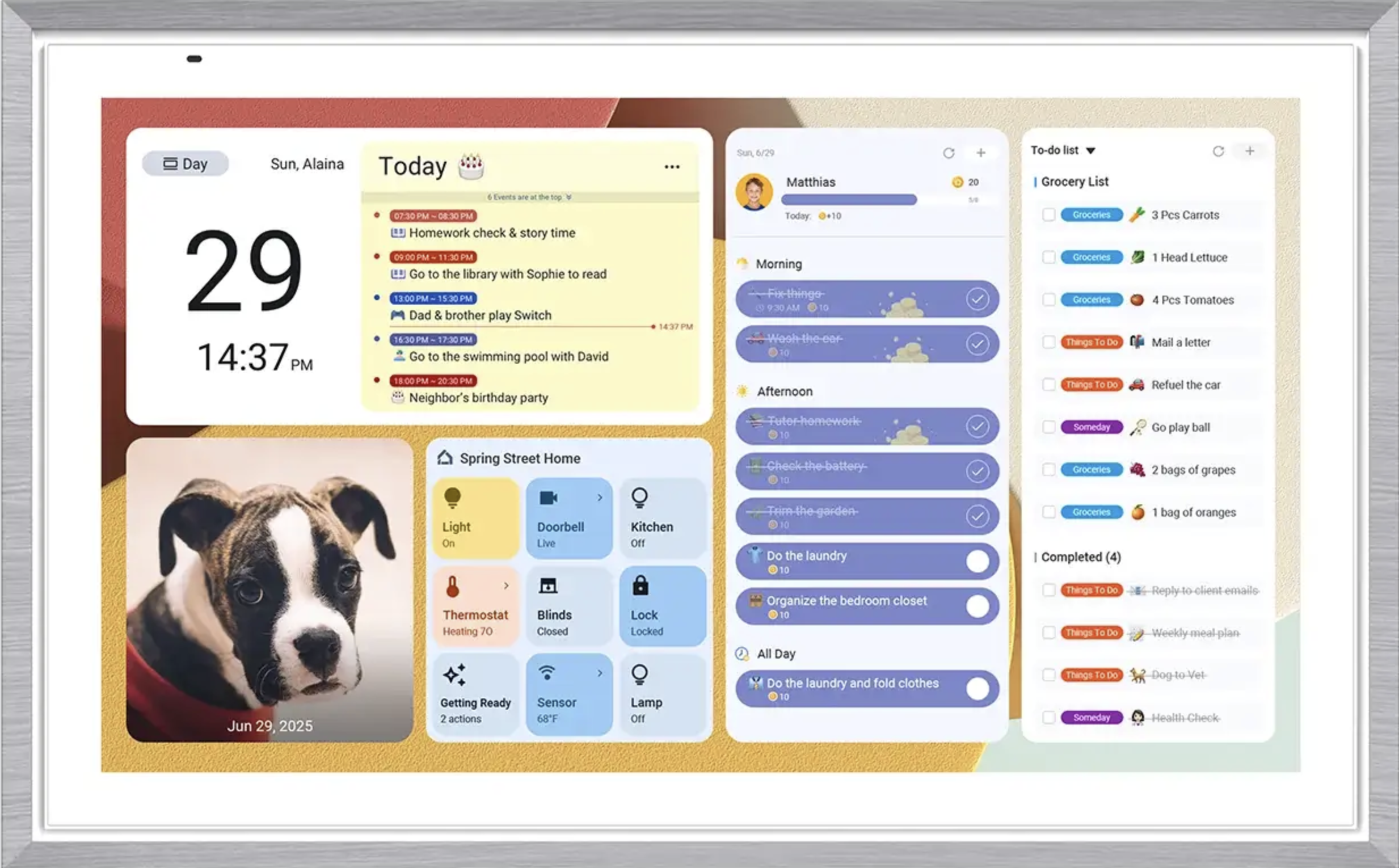
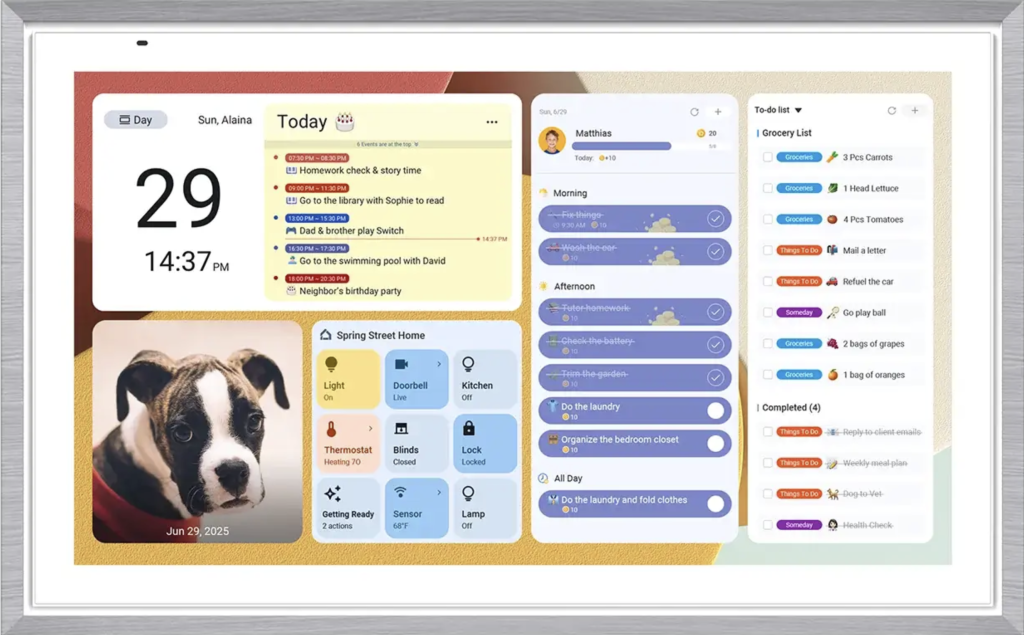
 Apolosign Digital Calendar is designed to help families manage schedules, chores, reminders, and daily routines from one central screen
Keeping a family organized sounds simple until everyone has different schedules, school events, work meetings, chores, grocery lists, appointments, and reminders scattered across phones, sticky notes, and paper calendars.
That is exactly the problem the Apolosign Digital Calendar is trying to solve.
Instead of relying on a traditional wall calendar that needs constant rewriting, Apolosign gives families a smart touchscreen display where they can view schedules, manage routines, create to-do lists, plan meals, track chores, and even display family photos in one place.
But is it really worth buying? Or is it just another expensive screen for the home?
In this Apolosign Digital Calendar review, we will look at what it does, who it is best for, what makes it different, and what you should consider before buying.
What Is the Apolosign Digital Calendar?
The Apolosign Digital Calendar is a smart family calendar and home organization display designed to help households manage daily life from one central screen.
It works like a digital wall calendar, but it offers more than just dates and events. Depending on how you use it, it can become a family command center for schedules, chores, routines, grocery lists, meal planning, reminders, and photo display.
Apolosign offers multiple screen sizes, including 15.6-inch, 21.5-inch, 27-inch, and a 27-inch 4K model. This gives buyers flexibility depending on whether they want a compact display for a desk or kitchen counter, or a larger wall-mounted calendar for the whole family to see.
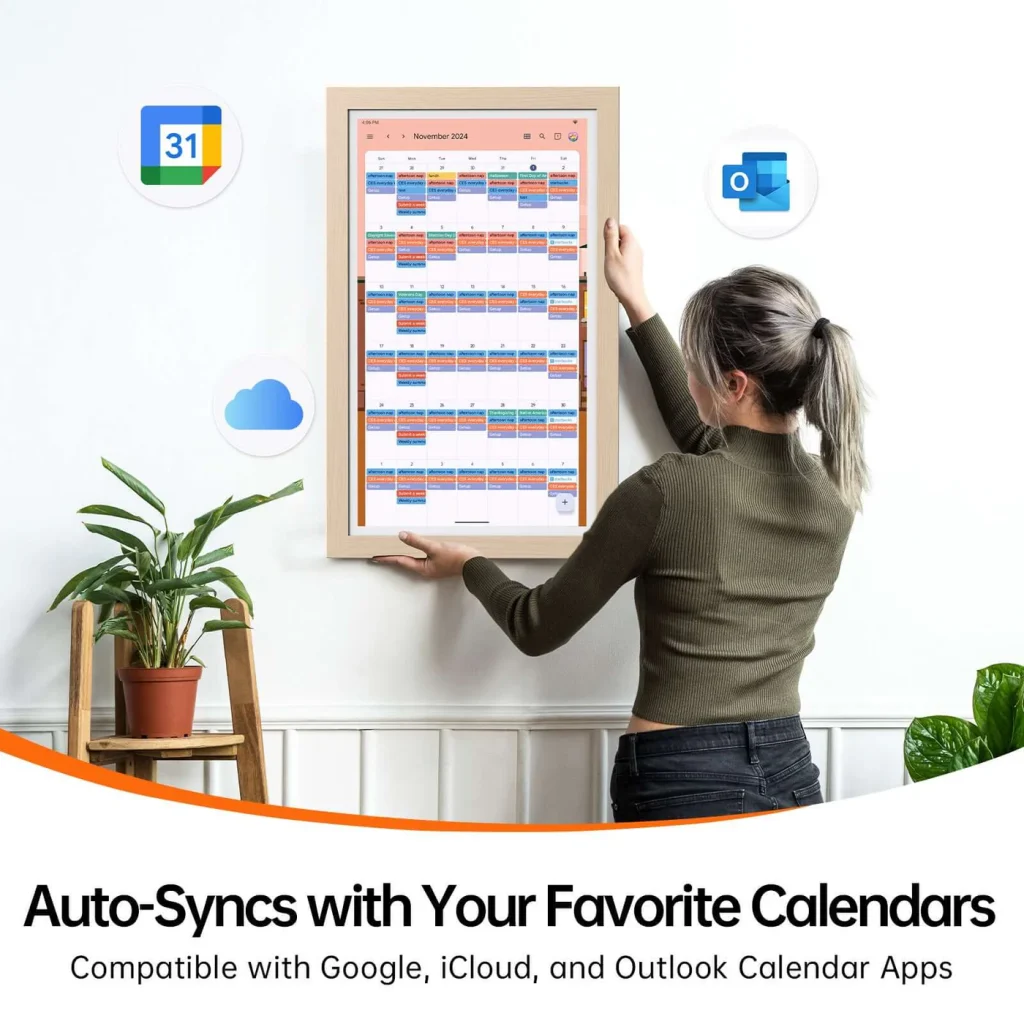
The product is especially useful for families who already use digital calendars such as Google Calendar, iCloud, Outlook, or similar platforms but want a physical screen at home where everyone can quickly check the day or week ahead.
Key Features of the Apolosign Digital Calendar
1. Dual-Mode Design
One of the most interesting features of the Apolosign Digital Calendar is its dual-mode system.
The first mode is Calendar Mode, which focuses on scheduling, routines, chores, tasks, and family organization. This is the mode most families will likely use every day.
The second mode is Android Mode, which allows the device to work more like a customizable smart display. Users can add widgets, access compatible apps, and personalize the dashboard based on their needs.
This dual-mode setup makes Apolosign more flexible than a basic digital calendar. It is not only for checking appointments; it can also work as a smart home dashboard, photo frame, routine tracker, and family planning hub.
2. Calendar Sync for Busy Families
The main reason most people buy a digital calendar is to make schedules easier to manage.
Apolosign supports syncing with popular calendar platforms such as Google Calendar, iCloud, Outlook, Yahoo, and others. This means family members can keep using the calendar apps they already know, while the Apolosign screen displays everything in one shared place.
For families, this can be extremely practical. Parents can see school activities, work meetings, sports practices, appointments, and family events without constantly checking different phones.
A central display also reduces the chance that someone says, “I didn’t know we had that today.”
3. Chores, Routines, and Rewards
Apolosign is not just about appointments. It also includes tools for routines, chores, and rewards.
This can be helpful for parents who want to teach children responsibility in a more visual and interactive way. Instead of reminding kids again and again, tasks can be displayed clearly on the screen.
For example, families can use it for morning routines, bedtime routines, homework reminders, pet care, cleaning tasks, or weekly chores. The reward system can also make tasks feel more motivating for children.
This feature makes Apolosign more useful than a normal tablet or regular calendar because it is designed around family organization, not just entertainment.
4. To-Do Lists and Shopping Lists
Another useful feature is the ability to create to-do lists, grocery lists, and shopping lists.
This sounds simple, but it can be very helpful in everyday life. Many families forget small tasks because reminders are spread across different apps, notes, and conversations. Having a shared screen where everyone can see what needs to be done makes daily coordination easier.
You can use it for grocery items, household supplies, weekend tasks, family errands, or personal reminders.
For busy homes, this can save time and reduce small daily frustrations.
5. Meal Planning
Meal planning is another feature that makes the Apolosign Digital Calendar useful for families.
Instead of asking “What should we eat tonight?” every day, families can plan meals ahead of time and keep the plan visible. This can make grocery shopping easier, reduce last-minute stress, and help families build a more organized weekly routine.
This feature is especially valuable for parents, people who cook at home often, or anyone trying to reduce food waste and avoid unnecessary takeout.
6. Digital Photo Frame Function
Apolosign can also work as a digital photo frame.
This is a nice bonus because it means the screen does not have to look empty or purely functional when you are not checking the calendar. You can use it to display family memories, personal photos, or a screensaver.
For many buyers, this makes the product feel warmer and more personal. Instead of looking like a piece of office equipment on the wall, it can blend more naturally into the home.
7. Customizable Dashboard
Because Apolosign has an Android-based mode, users can customize the dashboard with widgets and apps.
This can be useful if you want the screen to show more than just a calendar. For example, you may want quick access to weather, smart home controls, reminders, photos, music controls, or other useful information.
This is one of the reasons Apolosign may appeal to tech-friendly families. It gives you more flexibility than a locked-down device, although it may also require a little more setup and learning.
What I Like About the Apolosign Digital Calendar
The biggest strength of the Apolosign Digital Calendar is that it brings multiple family organization tools into one screen.
Many families already use digital tools, but the problem is that everything is hidden inside individual phones. A shared display changes that. Everyone in the house can glance at the schedule without opening an app.
Another strong point is the no-subscription approach for core features. Many smart home and family organization devices look affordable at first but require monthly or yearly fees to unlock the most useful tools. Apolosign is attractive because the core features are designed to work without ongoing subscription costs.
I also like that Apolosign offers multiple sizes. The 15.6-inch model makes sense for smaller spaces, while the 21.5-inch and 27-inch models are better for kitchens, hallways, or family command centers.
The combination of calendar sync, chores, routines, to-do lists, meal planning, and photo display makes it a practical all-in-one device for families who want better structure at home.
What Could Be Better?
The Apolosign Digital Calendar is useful, but it is not perfect for everyone.
First, because it has an Android-style experience, some users may need time to get used to the interface. If you want the simplest possible setup with almost no customization, another digital calendar may feel easier.
Second, Apple-heavy households should check compatibility carefully before buying. Apolosign can support iCloud calendar display, but users who expect deep two-way Apple Calendar syncing should review the setup process before making a decision.
Third, the larger models are better suited for wall mounting. If you want a tabletop calendar, the smaller model may be more practical.
Finally, this is not a cheap product. It may save time and improve organization, but it is still a premium home device. If your family is already perfectly happy with a paper calendar or a free phone app, you may not need it.
Pros and Cons
Pros
The Apolosign Digital Calendar offers a large, easy-to-read display for family schedules. It supports calendar syncing, chores, routines, rewards, to-do lists, shopping lists, and meal planning. It also works as a digital photo frame and offers a customizable Android-style dashboard.
Another major advantage is that the core family organization features do not require a monthly subscription. For buyers who dislike recurring fees, this is a strong selling point.
It is also available in different screen sizes, making it easier to choose a model that fits your home.
Cons
The interface may feel less simple for people who are not comfortable with Android-style devices. Some users may prefer a more guided, app-like experience.
It may also not be the best choice for people who only need a basic calendar. If you will not use the chores, routines, lists, or dashboard features, the price may be hard to justify.
Apple users should also check how they plan to use calendar syncing before buying, especially if two-way syncing is important to them.
Who Should Buy the Apolosign Digital Calendar?
The Apolosign Digital Calendar is best for families who want a central place to manage schedules and routines.
It is a good fit for parents with children, households with busy weekly schedules, families who already use Google Calendar or other digital calendars, and people who want to reduce clutter from sticky notes, paper planners, and scattered reminders.
It is also a strong option for buyers who want a digital calendar without paying monthly fees for basic family organization features.
If your home often feels disorganized, or if family members regularly forget appointments, chores, or plans, Apolosign could be a very useful upgrade.
 Meal planning can make weekly grocery shopping and family routines feel more organized.
Who Should Avoid It?
You may not need the Apolosign Digital Calendar if you live alone and only manage a simple schedule.
It may also not be the best choice if you prefer a very basic paper calendar or if you do not want another screen in your home.
If you are deeply invested in the Apple ecosystem and expect seamless two-way Apple Calendar control, you should check the setup and compatibility details carefully before purchasing.
Also, if your main goal is entertainment, such as watching videos or using streaming apps, a tablet or smart display may be a better choice. Apolosign is mainly designed for organization, not entertainment.
Apolosign Digital Calendar vs. Other Digital Calendars
Compared with some other smart family calendars, Apolosign stands out because of its no-subscription approach for core features.
Some competitors may offer a smoother or more polished software experience, but they may require a paid plan for features such as advanced meal planning, rewards, photo screensavers, or AI tools.
Apolosign is more appealing if you want strong value, a larger screen, and more flexibility through Android Mode.
However, if you want the easiest possible interface and do not mind paying for a subscription, you may want to compare Apolosign with other popular digital calendars before choosing.
Is the Apolosign Digital Calendar Worth It?
The Apolosign Digital Calendar is worth considering if your family needs a better way to manage schedules, chores, routines, meal planning, and shared reminders.
Its biggest value is not just the screen itself. The real value is having one visible place where the whole family can stay aligned.
For busy households, that can make daily life feel calmer and more organized.
It is especially worth considering if you want a digital family calendar without monthly fees for core features. The combination of calendar sync, chore tracking, rewards, lists, meal planning, photo display, and Android dashboard customization gives it strong everyday usefulness.
That said, it is not necessary for everyone. If you only need a simple calendar, or if you do not plan to use the extra family organization tools, it may be more than you need.
Apolosign Digital Calendar Size Comparison
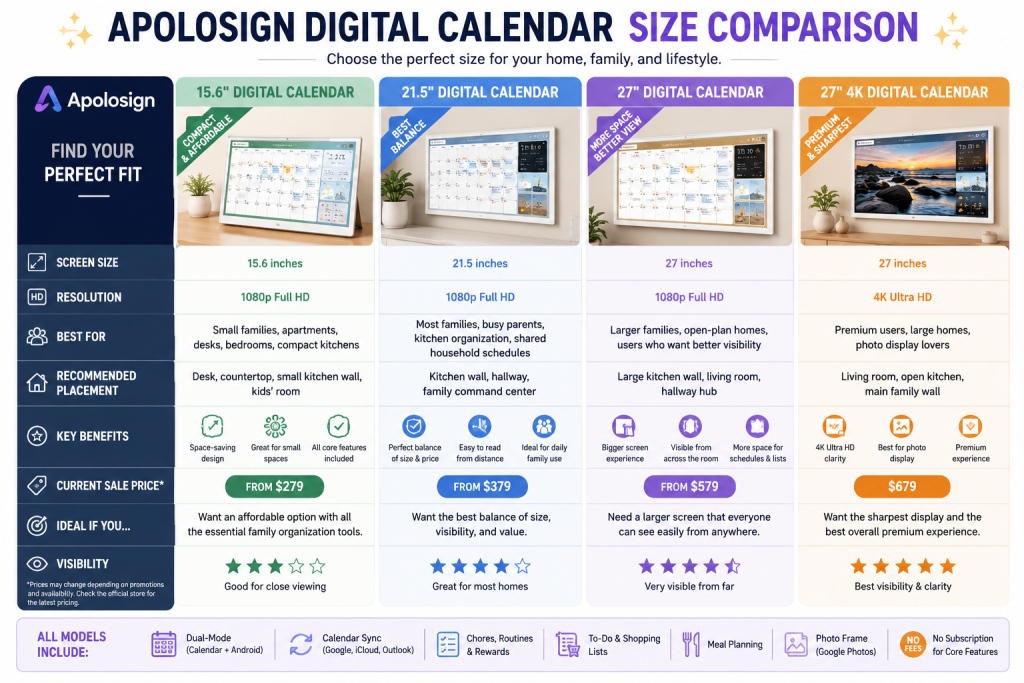 *Prices may change depending on promotions, availability, and official store updates.
Which Apolosign Digital Calendar Size Should You Choose?
If you want the most affordable option, the 15.6-inch Apolosign Digital Calendar is a good starting point. It is compact, practical, and suitable for smaller spaces.
For most families, the 21.5-inch model is probably the best choice. It offers a strong balance between screen size, price, and everyday usability. It is large enough to work well as a family command center without feeling oversized.
If you have a larger home or want the calendar to be visible from farther away, the 27-inch model makes more sense. It gives you more screen space for schedules, chores, lists, and reminders.
The 27-inch 4K model is the best option if you want the sharpest display and plan to use the device not only as a family calendar but also as a digital photo frame or smart home dashboard.
Quick Recommendation:
For most buyers, the Apolosign 21.5″ Digital Calendar offers the best overall value. It is large enough for family use, easier to place than the 27-inch models, and more affordable than the premium 4K version.
Final Verdict
Overall, the Apolosign Digital Calendar is a practical and feature-rich smart family organizer for households that want to bring order to busy daily routines.
It is best for families, parents, and shared households that need a central screen for schedules, chores, reminders, meals, and lists. The no-subscription structure for core features makes it especially attractive compared with some competing digital calendars.
If you want a smart family calendar that does more than display dates, Apolosign is definitely worth checking out.
Final Rating: 4.4/5
Best For: Busy families, parents, shared households, digital calendar users
Not Best For: Minimalists, solo users, buyers who only need a basic calendar
Apolosign Digital Calendar Review: Final Recommendation
If you are looking for a smarter way to organize your family schedule, chores, routines, and daily reminders, the Apolosign Digital Calendar is a strong option to check before making your final decision.
FAQs
Does the Apolosign Digital Calendar require a subscription?
The core calendar, chores, rewards, to-do lists, and photo display features are designed to work without a required monthly subscription. Some optional AI-related features may require a separate subscription.
Can Apolosign sync with Google Calendar?
Yes, Apolosign supports syncing with popular calendar platforms, including Google Calendar. This makes it useful for families who already manage schedules digitally.
Is Apolosign good for families with kids?
Yes. The chores, routines, and rewards features make it especially useful for families with children. Parents can assign tasks and help kids build better daily habits.
Can Apolosign be used as a photo frame?
Yes. Apolosign can display personal photos and work as a digital photo frame when you are not actively using the calendar.
Which Apolosign Digital Calendar size should I choose?
The 15.6-inch model is better for smaller spaces or tabletop use. The 21.5-inch model is a balanced choice for many kitchens or family rooms. The 27-inch models are better for larger spaces where visibility matters most.
Is the Apolosign Digital Calendar better than a paper calendar?
For families with changing schedules, digital syncing, reminders, chores, and shared tasks, Apolosign is much more flexible than a paper calendar. However, if your schedule is very simple, a paper calendar may still be enough.
Leave a Reply