

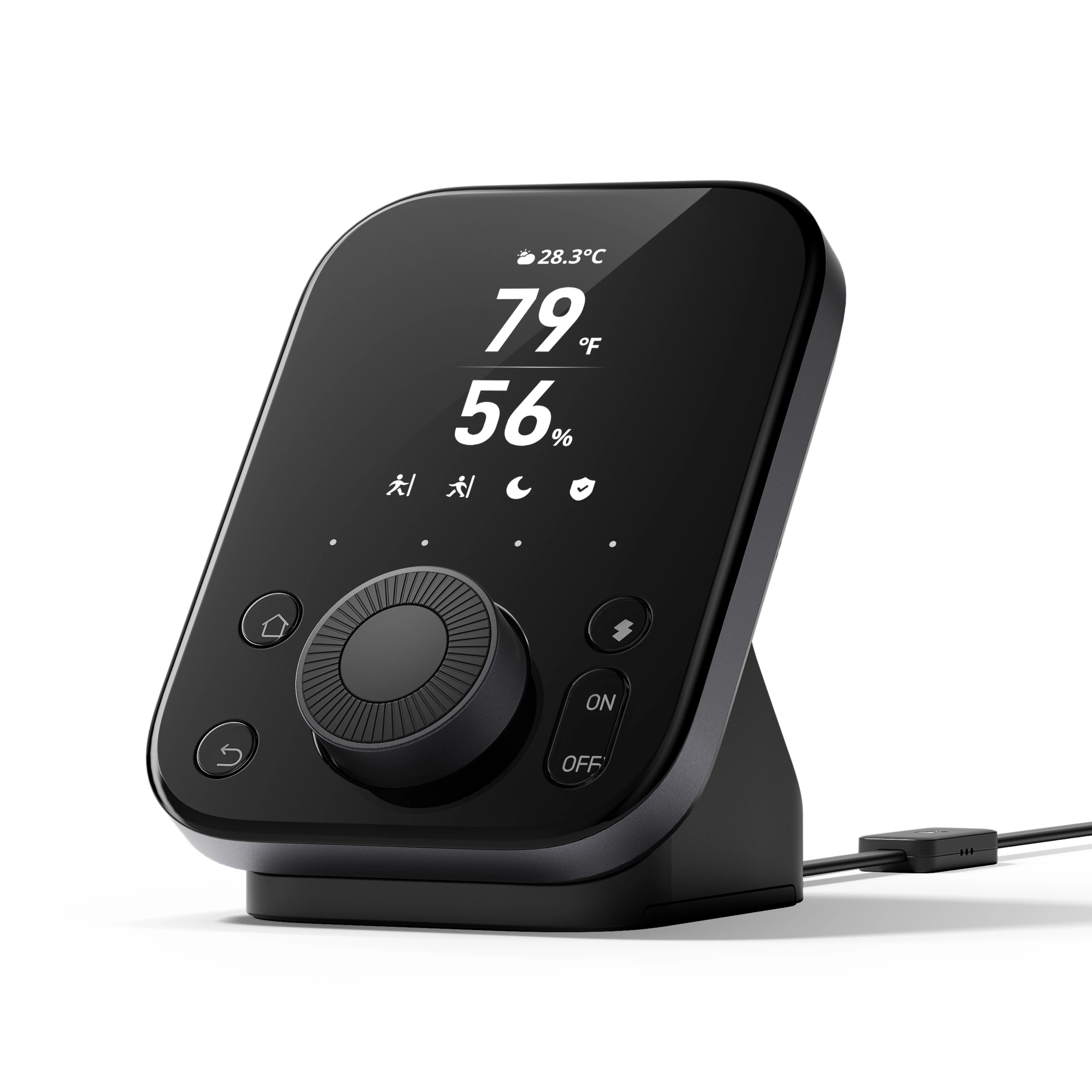
The SwitchBot Hub 3 combines a smart home hub, infrared remote, environmental monitor, Matter bridge, and physical controller in one device. Image credit: SwitchBot official product media.
Editorial note: This review is based on official specifications, compatibility documentation, product information, and a practical assessment of how the Hub 3’s features fit into a real smart home. Product prices and compatibility may change over time.
SwitchBot Hub 3 Review: Quick Verdict
The SwitchBot Hub 3 is one of the most capable smart home controllers SwitchBot has released. It combines a Matter bridge, infrared remote, environmental sensors, physical scene controller, rotary dial, display, Bluetooth gateway, and automation hub in one compact device.
Its biggest advantage is convenience.
Instead of reaching for your phone whenever you want to adjust an air conditioner, dim compatible lights, close the curtains, activate a scene, or check the room temperature, you can control frequently used functions directly from the Hub 3.
The large display, physical buttons, and Dial Master rotary controller make it more accessible than a traditional smart home hub hidden beside a router.
However, the Hub 3 is not a universal replacement for every smart home bridge. It does not act as a general Zigbee or Z-Wave coordinator, it requires constant power, and its $119.99 official US price is difficult to justify if you only own one or two SwitchBot products. The official specifications list 2.4GHz Wi-Fi and Bluetooth Low Energy connectivity, while its Matter bridge can support up to 30 compatible sub-devices.
Worthflect Rating: 8.5/10
| Category | Rating |
|---|---|
| Design and controls | 9/10 |
| Ease of setup | 8.5/10 |
| SwitchBot integration | 9.5/10 |
| Matter compatibility | 8.5/10 |
| Infrared control | 8/10 |
| Automation features | 9/10 |
| Value for money | 7.5/10 |
| Overall | 8.5/10 |
Best For
The SwitchBot Hub 3 is best for people who already own several SwitchBot devices, want to bring them into Apple Home or another Matter-compatible platform, and prefer physical controls instead of relying entirely on a smartphone.
Consider Skipping It If
You only need basic remote access for one or two SwitchBot products, already own a Hub 2 that meets your needs, or require a dedicated Zigbee, Z-Wave, or Thread border router.
SwitchBot Hub 3 Pros and Cons
Pros
- Excellent integration with the SwitchBot ecosystem
- Matter bridge supports up to 30 compatible sub-devices
- Works with Apple Home through Matter
- Can control selected third-party Matter devices
- Built-in infrared control for older appliances
- Useful Dial Master rotary controller
- Four customizable scene shortcuts
- Temperature, humidity, light, and motion sensing
- Displays weather and compatible lock information
- Can sit on a desk or be mounted on a wall
- Easier for family members than app-only smart home controls
Cons
- Expensive compared with Hub 2 and Hub Mini
- Requires constant wired power
- Only supports 2.4GHz Wi-Fi
- Not a Zigbee or Z-Wave hub
- Infrared devices may not provide accurate status feedback
- Some displayed information requires additional SwitchBot products
- Third-party Matter support does not mean universal compatibility
- Existing Hub 2 owners may not need to upgrade
What Is the SwitchBot Hub 3?
The SwitchBot Hub 3 is an all-in-one smart home control center designed to connect SwitchBot Bluetooth devices to Wi-Fi, control traditional infrared appliances, bridge compatible devices into Matter ecosystems, monitor room conditions, and trigger automations through physical buttons.
It can connect products such as:
- SwitchBot Curtain
- SwitchBot Blind Tilt
- SwitchBot Lock
- SwitchBot Bot
- SwitchBot sensors
- SwitchBot meters
- Compatible air conditioners
- Televisions
- Fans
- Soundbars
- Streaming devices
- Selected third-party Matter products
Unlike a standard hub that works quietly in the background, the Hub 3 is intended to remain visible and accessible.
Its front panel contains a display, rotary dial, home and back buttons, customizable controls, and dedicated on and off buttons. That allows it to function as both the brain of a SwitchBot setup and a physical smart home remote.
SwitchBot Hub 3 Specifications
| Specification | SwitchBot Hub 3 |
|---|---|
| Dimensions | 126 × 94 × 38 mm |
| Weight | 190 g |
| Connectivity | 2.4GHz Wi-Fi and Bluetooth Low Energy |
| Matter bridge capacity | Up to 30 compatible sub-devices |
| Physical control | Dial Master rotary dial and buttons |
| Custom scene shortcuts | Four |
| Sensors | Temperature, humidity, light, and motion |
| Infrared control | Yes |
| Weather display | Yes |
| CO₂ display | Requires SwitchBot Meter Pro CO₂ |
| Lock status display | Requires a compatible SwitchBot Lock |
| Power | 5V/2A wired adapter |
| Placement | Desktop stand or wall mounting |
| Official US price | $119.99 at the time of writing |
| US warranty | One year |
SwitchBot lists the Hub 3 at 126 × 94 × 38 mm and 190 g. The official US product page currently lists the single-unit price at $119.99 and includes a one-year warranty.
Design and Physical Controls
The SwitchBot Hub 3 looks more like a dedicated smart home control panel than a traditional hub.
Its glossy black front, angled stand, clear information display, and large rotary dial give it a more premium appearance than the Hub Mini or Hub 2.
The central Dial Master is the most important design feature. Depending on the connected device, it can be used to:
- Adjust light brightness
- Change an air conditioner’s temperature
- Control speaker volume
- Move through device menus
- Select scenes
- Confirm commands
The Hub also includes four customizable scene shortcuts. These can be assigned to routines such as:
- Good Morning
- Good Night
- Leave Home
- Movie Night
- Turn Off Everything
- Close All Curtains
- Start the Air Conditioner
- Activate Party Lighting
SwitchBot states that the dial can adjust brightness, air-conditioning temperature, and speaker volume, while four scene shortcuts can be configured for quick access.
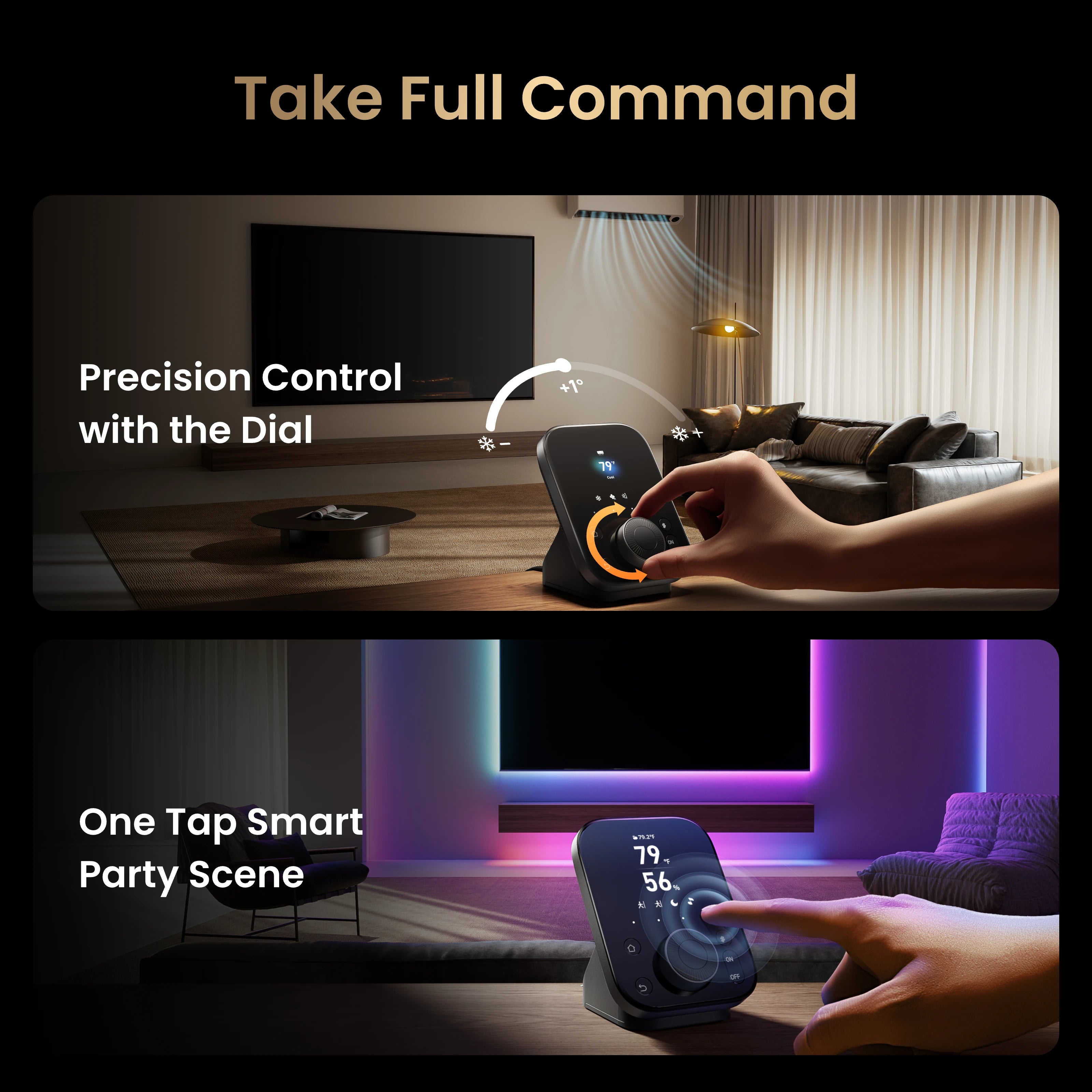
The Dial Master can adjust compatible settings such as air-conditioning temperature, while programmable buttons provide one-tap access to smart home scenes. Image credit: SwitchBot official product media.
Why Physical Controls Matter
Many smart homes become inconvenient when every action requires a phone.
You may need to unlock the phone, open an app, find the correct room, select a device, and then adjust its settings. Voice assistants can help, but voice control is not always appropriate especially late at night or when other people are sleeping.
The Hub 3 solves part of this problem by giving frequently used controls a permanent physical location.
This can be especially useful for:
- Children
- Older family members
- Visitors
- People without the SwitchBot app
- Anyone who prefers buttons over voice commands
- Households with several shared devices
The Hub 3 works best when you configure its shortcuts around actions you perform every day. If your most common routines are assigned to the front buttons, it can save considerably more time than using the app.
Setup and Everyday Use
The standard setup process should be familiar to existing SwitchBot users:
- Connect the Hub 3 to power.
- Open the SwitchBot app.
- Sign in or create a SwitchBot account.
- Select the option to add a new device.
- Choose SwitchBot Hub 3.
- Connect it to a 2.4GHz Wi-Fi network.
- Add nearby SwitchBot Bluetooth devices.
- Configure infrared appliances.
- Assign scenes and shortcuts.
- Connect the Hub to a Matter platform if required.
The Hub 3 does not support direct connection to a 5GHz-only Wi-Fi network. Users with combined 2.4GHz and 5GHz networks may need to ensure their router allows smart home products to connect through the 2.4GHz band. SwitchBot officially lists 802.11b/g/n 2.4GHz Wi-Fi and Bluetooth Low Energy as its connectivity modes.
Once configured, the display can present useful information such as:
- Indoor temperature
- Indoor humidity
- Outdoor weather
- Alarm information
- Compatible lock status
- CO₂ readings from a Meter Pro CO₂
- Assigned device controls
- Smart home scenes
The display is not simply decorative. It allows the Hub 3 to work as a small home dashboard rather than only acting as a background gateway.
Infrared Remote Control
One of the most practical Hub 3 features is infrared control.
Many household appliances still use traditional infrared remotes, including:
- Air conditioners
- Televisions
- Fans
- Soundbars
- Projectors
- Media players
- Older lighting products
The Hub 3 can bring compatible infrared appliances into the SwitchBot app and include them in scenes and automations.
For example, you could configure the Hub 3 to:
- Turn on an air conditioner when the room becomes too warm
- Turn off the television as part of a bedtime routine
- Activate a fan when humidity rises
- Start the television and dim the lights with a Movie Night scene
- Pre-cool a room before arriving home
This is valuable because you do not necessarily need to replace an older appliance with a new smart model.
The Main Limitation of Infrared Control
Infrared communication is normally one-way.
The Hub sends a command to the appliance, but many appliances do not send their current status back. As a result, the Hub may not always know whether a television, fan, or air conditioner is currently on or off.
This is especially important when a remote uses the same button for both power states.
For example, suppose the Hub believes a television is off when it is already on. Sending another power command could turn the television off instead of on.
Infrared control is therefore most reliable when:
- The appliance has separate on and off commands
- The Hub has a clear line of sight
- Scenes use simple command sequences
- The appliance responds consistently
- Other remotes are not frequently changing its status
The Hub 3 makes infrared appliances more convenient, but it cannot give every older device the same two-way communication as a native smart product.
Matter and Apple Home Support
Matter support is one of the strongest reasons to choose the Hub 3.
The Hub can act as a Matter bridge for up to 30 compatible SwitchBot sub-devices. This is significantly more than the eight-device Matter capacity officially shown for the Hub 2.
Through Matter, supported products can be added to compatible platforms such as:
- Apple Home
- Google Home
- Amazon Alexa
- Samsung SmartThings
- Home Assistant
- Homey
Not every feature of every device will necessarily appear in every platform. Matter compatibility depends on the supported device category, firmware, platform implementation, and the controls exposed by SwitchBot.
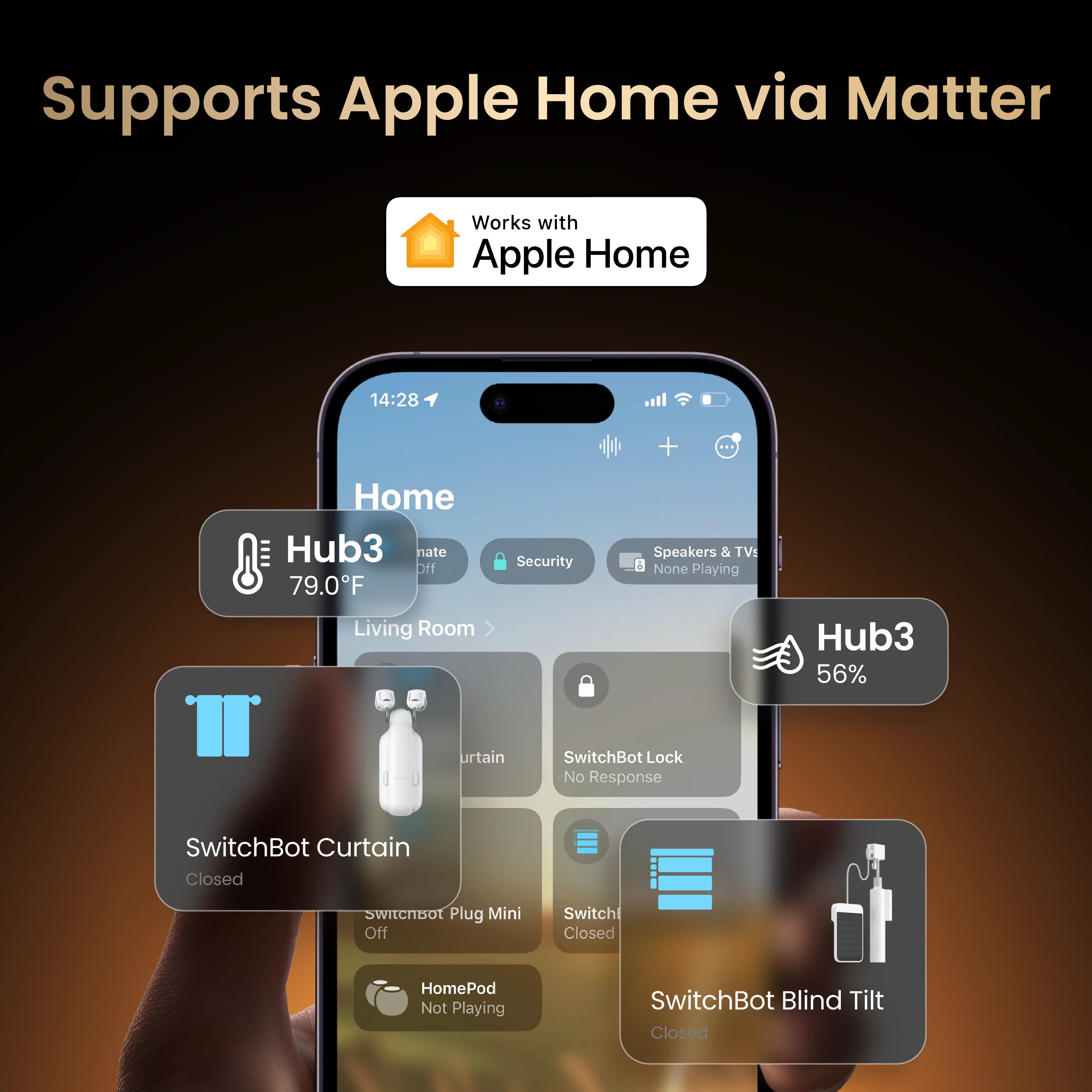
SwitchBot Hub 3 can bridge compatible SwitchBot products into Apple Home through Matter. Image credit: SwitchBot official product media.
Using SwitchBot Hub 3 With Apple Home
Apple Home support is particularly important for users who want SwitchBot products to appear alongside HomeKit and Matter devices from other brands.
SwitchBot’s official setup documentation states that the Hub 3 can synchronize up to 30 supported sub-devices with the Apple Home app. Its physical buttons can also be used to trigger Apple Home automations.
That means a Hub 3 shortcut could potentially activate an Apple Home routine involving products outside the SwitchBot ecosystem.
This turns the Hub 3 into more than a SwitchBot remote. It can act as a physical control point for a broader Matter-based smart home.
Using SwitchBot Hub 3 With Home Assistant
The Hub 3 may also appeal to Home Assistant users who want a physical scene controller rather than a wall-mounted tablet.
Matter can allow compatible SwitchBot devices and controls to appear inside Home Assistant. However, the exact entities and functionality available may vary by device, firmware, and Home Assistant’s current Matter implementation.
Users building advanced Home Assistant systems should confirm that each required SwitchBot device and function is supported before purchasing the Hub solely for this purpose.
Temperature, Humidity, Light, and Motion Sensors
The SwitchBot Hub 3 includes what the company describes as 4-in-1 Smart Sense:
- Temperature sensing
- Humidity sensing
- Light sensing
- Motion detection
These sensors can be used to create context-based automations.
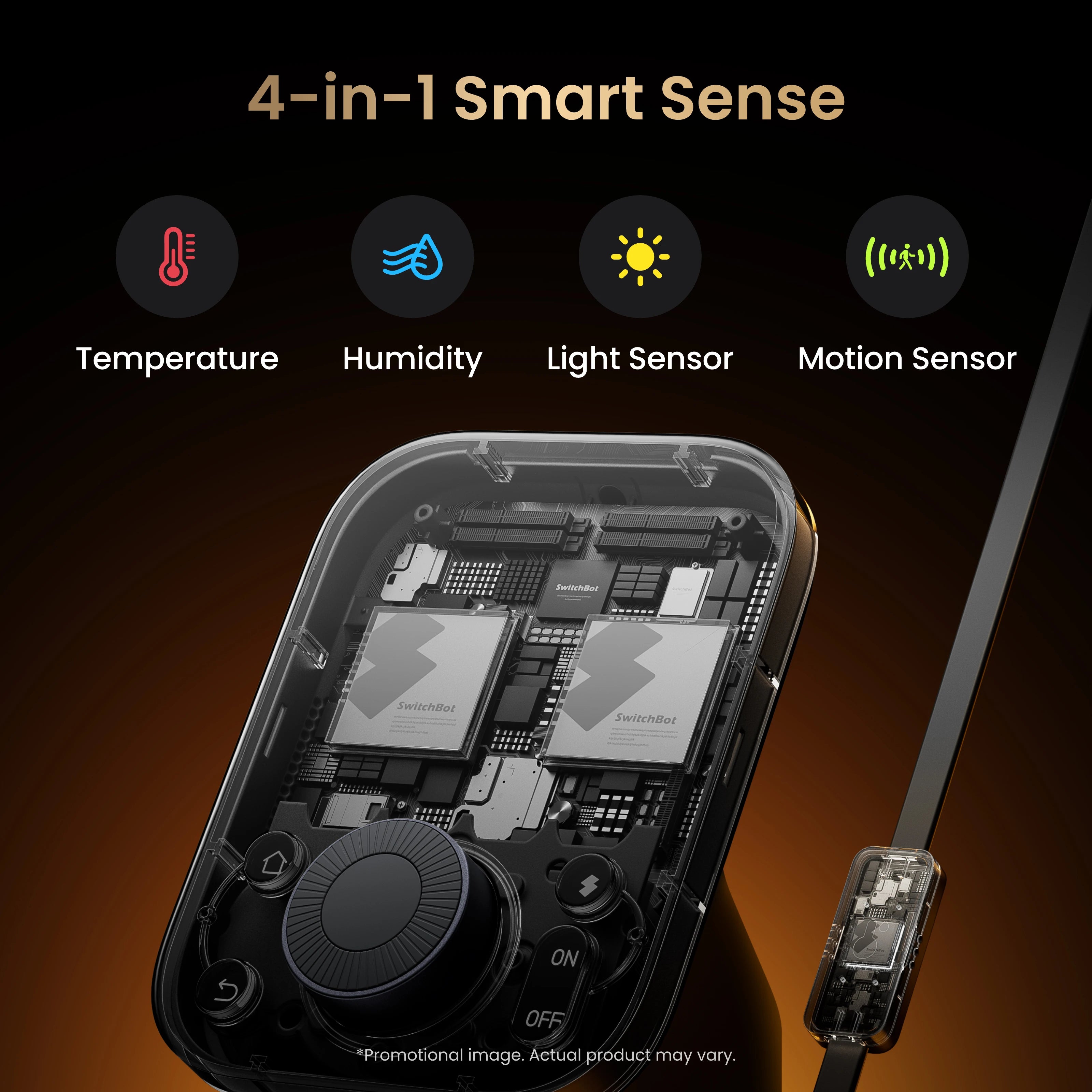
The Hub 3 combines temperature, humidity, light, and motion sensing to support more responsive home automations. Image credit: SwitchBot official product media.
Possible automation ideas include:
- Turn on an air conditioner when the temperature rises
- Activate a humidifier when humidity falls too low
- Turn on lights when motion is detected after dark
- Close curtains during the hottest part of the day
- Reduce lighting when the room becomes bright enough
- Trigger a night routine when no motion is detected
- Receive an alert when someone enters a room
- Adjust the home environment based on weather or time
The official product comparison confirms support for temperature and humidity sensing, light sensing, motion detection, weather display, CO₂ display, and compatible lock-status information.
Important Additional-Device Requirements
Some information shown on the Hub 3 requires additional SwitchBot products.
For example:
- CO₂ readings require SwitchBot Meter Pro CO₂
- Lock status requires a compatible SwitchBot Lock
- Door-related alerts may require compatible sensors or security products
- Curtain controls require SwitchBot Curtain or Blind Tilt
- Some device actions require Matter-compatible products
The Hub 3 does not independently measure CO₂, and buyers should account for the additional cost of compatible accessories when planning a complete system.
SwitchBot Hub 3 vs Hub 2
| Feature | SwitchBot Hub 3 | SwitchBot Hub 2 |
|---|---|---|
| Main interface | Display, Dial Master and multiple buttons | Simpler display and touch buttons |
| Matter bridge capacity | Up to 30 sub-devices | Up to 8 sub-devices |
| Custom scene shortcuts | Four | Two primary scene buttons |
| Temperature and humidity | Yes | Yes |
| Light sensor | Yes | Yes |
| Motion detection | Yes | No |
| CO₂ display | Yes, with Meter Pro CO₂ | No |
| Lock status display | Yes, with compatible lock | No |
| Weather display | Yes | Yes |
| Infrared control | Yes | Yes |
| Physical rotary control | Yes | No |
| Best suited for | Larger systems and direct physical control | Simpler automations and smaller setups |
The Hub 3 is clearly the more capable product.
Its major upgrades include:
- Higher Matter sub-device capacity
- Dial Master rotary control
- More physical shortcuts
- Motion detection
- CO₂ information support
- Lock-status information
- More detailed device control
- A stronger role as a central smart home panel
However, that does not automatically make it the better purchase for everyone.
The Hub 2 remains sufficient when you mainly need to:
- Connect a few SwitchBot devices to Wi-Fi
- Control infrared appliances
- Monitor temperature and humidity
- Use one or two basic scenes
- Bridge a smaller number of products into Matter
- Spend less on a smart home hub
Existing Hub 2 owners should upgrade only when they will actively use the new display, rotary dial, additional scene controls, motion sensing, or expanded Matter capacity.
What Could Be Better?
1. It Is Not a Complete Universal Smart Home Hub
The Hub 3 supports SwitchBot devices, infrared appliances, and selected Matter products, but it is not a general-purpose Zigbee or Z-Wave coordinator.
Homes built around Zigbee or Z-Wave may still require separate bridges.
2. The Price Is High for Small Setups
At $119.99, the Hub 3 is difficult to justify when you only need remote access for one SwitchBot Bot, curtain motor, or air conditioner.
Its value increases as the number of connected devices and automations grows.
3. It Must Remain Connected to Power
Despite looking like a remote control, the Hub 3 is not designed to be carried around the home.
It uses a 5V/2A wired power supply and is intended to remain on its stand or wall mount.
4. Infrared Status Is Not Always Reliable
Older infrared appliances may not report their current status, which can make advanced scenes less dependable.
5. Some Features Require Extra Products
CO₂ readings, lock information, curtain controls, and certain security alerts require additional SwitchBot hardware.
The total cost of a complete system can therefore be considerably higher than the price of the Hub alone.
6. Matter Compatibility Has Limits
A Matter logo does not guarantee that every feature of every product will appear on every platform.
Users should verify compatibility for the specific devices and controls they plan to use.
Who Should Buy the SwitchBot Hub 3?
Existing SwitchBot Users With Several Devices
The Hub 3 makes the most sense when you already own curtains, Bots, locks, meters, sensors, or other SwitchBot products.
It provides a central control point while expanding remote access, automation, and Matter integration.
Apple Home Users
The ability to bridge up to 30 compatible sub-devices into Apple Home is a major advantage over older SwitchBot hubs.
Homes With Several Infrared Appliances
If your home contains older air conditioners, televisions, fans, or sound systems, the Hub 3 can make them easier to control without replacing them.
People Who Prefer Physical Controls
The Dial Master, customizable buttons, and permanent display are useful for anyone who dislikes phone-only smart home control.
Families With Shared Smart Home Devices
Visitors and family members can activate common scenes without signing into an app or learning voice commands.
Users Building More Advanced Automations
Temperature, humidity, light, motion, weather, and time-based conditions provide a strong foundation for practical home automation.
Who Should Skip It?
Consider a cheaper hub when:
- You only own one or two SwitchBot products.
- Your Hub 2 already does everything you need.
- You do not need a display or physical controls.
- You need native Zigbee or Z-Wave connectivity.
- Most of your products already connect directly to your chosen platform.
- You want a portable handheld remote.
- You expect every third-party smart device to work fully with the Hub.
- You are building only a basic infrared automation setup.
Final Verdict: Is the SwitchBot Hub 3 Worth It?
The SwitchBot Hub 3 is worth buying when you want more than a basic smart home bridge.
Its combination of Matter bridging, infrared control, environmental sensors, physical scene buttons, Dial Master controls, weather information, and automation support makes it one of the most versatile products in the SwitchBot ecosystem.
The physical interface is what separates it from cheaper alternatives.
Instead of acting only as invisible background hardware, the Hub 3 becomes a control point that people can actually interact with throughout the day.
It is particularly compelling for homes that contain:
- Several SwitchBot devices
- Older infrared appliances
- Apple Home or Matter products
- Multiple shared scenes
- Family members who prefer buttons
- Temperature or motion-based automations
However, the Hub 3 is not an essential upgrade for every Hub 2 owner.
If your current hub reliably controls a few devices and you rarely interact with it directly, the added screen, dial, and sensors may not justify the higher price.
Worthflect Recommendation
Recommended with conditions.
Buy the SwitchBot Hub 3 if you are building a larger SwitchBot-centered smart home and will regularly use its display, Matter bridge, Dial Master, physical shortcuts, sensors, and infrared controls.
Choose the Hub 2 or Hub Mini if you mainly need affordable remote access and simple automation.
Frequently Asked Questions
Does SwitchBot Hub 3 Work With Apple Home?
Yes. The Hub 3 can bridge supported SwitchBot devices into Apple Home through Matter. SwitchBot states that up to 30 compatible sub-devices can be synchronized with the Apple Home app.
Does SwitchBot Hub 3 Work With Home Assistant?
The Hub 3 can be integrated through Matter, although the exact devices, entities, and controls available may depend on firmware and Home Assistant’s current Matter support.
Can SwitchBot Hub 3 Control Non-SwitchBot Devices?
It can control compatible infrared appliances and selected third-party Matter products. It does not automatically support every Wi-Fi, Bluetooth, Zigbee, or Z-Wave device.
Does SwitchBot Hub 3 Support 5GHz Wi-Fi?
No. Its official connectivity specification lists 2.4GHz Wi-Fi and Bluetooth Low Energy.
Does SwitchBot Hub 3 Measure CO₂?
Not by itself. CO₂ readings require a separate SwitchBot Meter Pro CO₂.
Can SwitchBot Hub 3 Control an Air Conditioner?
Yes, provided the air conditioner uses a compatible infrared remote. The Dial Master can also adjust temperature for supported configurations.
Can It Replace a Television Remote?
It can control many compatible infrared televisions and related entertainment equipment. However, the Hub remains connected to power, so it works better as a fixed control panel than a handheld remote.
How Many Matter Devices Can SwitchBot Hub 3 Support?
SwitchBot states that it can bridge up to 30 compatible sub-devices into Matter platforms.
Is SwitchBot Hub 3 Better Than Hub 2?
The Hub 3 is more capable, with a rotary dial, more shortcuts, motion sensing, expanded information display, and support for up to 30 Matter sub-devices. The Hub 2 may still provide better value for smaller setups.
Is Upgrading From Hub 2 Worth It?
An upgrade is most worthwhile when you need the physical interface, additional scene controls, motion detection, expanded Matter capacity, lock information, or CO₂ display support.
Affiliate Disclosure
Worthflect may earn a commission when you purchase through links on this page. This does not affect the price you pay or our editorial conclusions.
Image Credits
All product images used in this article are official SwitchBot promotional media. Images are included for editorial product-review purposes. Product appearance, software interfaces, availability, and displayed features may change through updates.


Leave a Reply