
Quick Verdict
The SwitchBot Hub 2 is still worth buying if you already own SwitchBot devices or want to make older infrared appliances smarter without replacing them.
Its biggest strength is convenience. One compact device combines an infrared remote hub, a Bluetooth gateway for SwitchBot products, temperature and humidity monitoring, a light sensor, and two programmable touch buttons.
However, the buying decision is less straightforward now that the more capable SwitchBot Hub 3 exists. Hub 2 supports only eight Matter sub-devices, while Hub 3 supports up to 30 and provides more physical controls. At its current official price of $69.99, Hub 2 remains a sensible mid-range option, but it becomes especially attractive when discounted below $60.
Worthflect Rating: 8.2/10
Best for: Existing SwitchBot users, renters, Apple Home users and homes with older infrared appliances.
Skip it if: You are building a large Matter system, need more than eight bridged devices or want the advanced controls offered by Hub 3.
SwitchBot Hub 2 functioning as a smart home hub, environmental monitor, smart remote and button controller

SwitchBot Hub 2 combines four useful smart-home functions in one compact device.
Source: SwitchBot official product media.
Review note: This assessment is based on current official specifications, support documents, setup instructions and owner feedback rather than a long-term laboratory test.
SwitchBot Hub 2 Pros and Cons
Pros
- Controls older TVs, air conditioners, fans and other infrared appliances
- Adds remote access to compatible Bluetooth-only SwitchBot products
- Supports Matter and Apple Home integration
- Built-in temperature, humidity and ambient-light monitoring
- Two programmable touch buttons
- Compact design with an adjustable display
- Useful automation options through the SwitchBot app
Cons
- Connects only to 2.4GHz Wi-Fi
- Limited to eight Matter sub-devices
- Some Matter functions are simplified inside Apple Home
- Display and buttons are less capable than those on Hub 3
- Specialized sensor cable must remain connected
- Matter setup can be less predictable than basic SwitchBot app control
What Is the SwitchBot Hub 2?
SwitchBot Hub 2 is a central controller designed to connect several different parts of a smart home.
It communicates with Bluetooth SwitchBot products, connects them to Wi-Fi and allows compatible devices to be controlled remotely. It also contains an infrared transmitter capable of replacing many traditional remotes for televisions, air conditioners, projectors, fans and similar appliances.
The front display shows temperature and humidity. An ambient-light sensor adjusts screen brightness, while two touch-sensitive buttons can activate individual devices or complete automation scenes. The temperature and humidity sensor is built into the supplied USB-C power cable rather than the main unit.
The hub measures 80 × 70 × 23mm, weighs 63g and includes a two-metre data cable. It is powered continuously through USB-C and comes with a one-year official warranty.
Diagram showing the four main functions of SwitchBot Hub 2
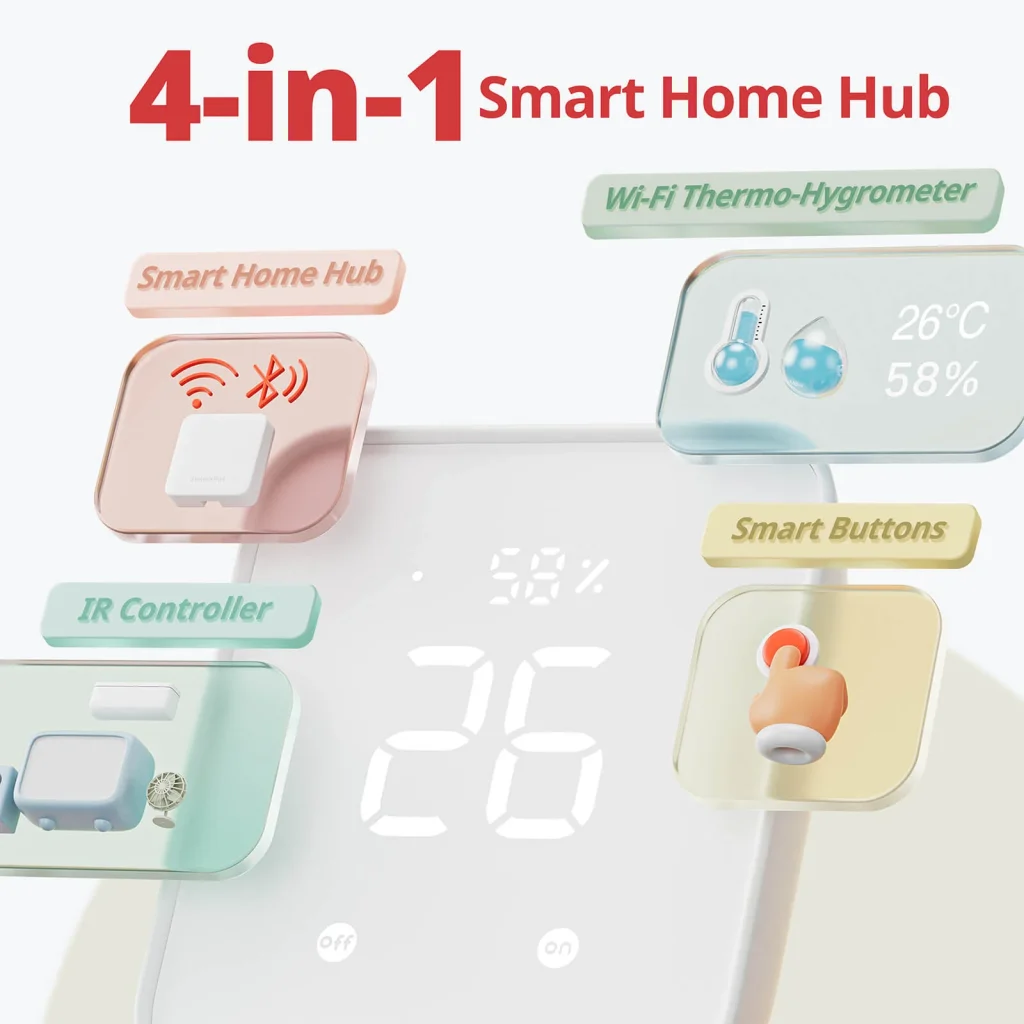
Caption: The four-in-one design is the main reason to choose Hub 2 over a basic infrared hub.
Source: SwitchBot official product media.
Setup and Everyday Use
Initial setup begins in the SwitchBot app. After connecting the hub to power, you add it to your account, connect it to your home network and install any available firmware updates.
One important limitation is that Hub 2 uses 2.4GHz Wi-Fi rather than 5GHz. SwitchBot recommends temporarily disabling the 5GHz band if a dual-band router prevents the hub from joining the network. This will not affect most users after setup, but it can create some initial frustration with routers that combine both bands under one network name.
The hub should also be positioned thoughtfully. It needs to remain within Bluetooth range of your SwitchBot products and within infrared range of the appliances you want to control. Placing it in a relatively open central position normally produces better results than hiding it inside a cabinet.
Once configured, everyday control is straightforward. You can use:
- The SwitchBot mobile app
- The two buttons on the hub
- Apple Watch controls
- Alexa or Google Assistant
- Siri and Apple Home through Matter
- SwitchBot scenes and schedules
SwitchBot officially supports app, voice, watch and one-touch control, allowing the hub to act as a replacement for several different remotes and control methods.
SwitchBot Hub 2 control methods including touch, voice, phone and Apple Watch
Caption: Hub 2 can be controlled through its buttons, the SwitchBot app, voice assistants and an Apple Watch.
Alt text: SwitchBot Hub 2 being controlled by touch, Alexa voice commands, smartphone and Apple Watch
Source: SwitchBot official product media.
Infrared Control: The Most Immediately Useful Feature
For many buyers, the infrared controller provides more practical value than Matter.
Instead of replacing a working television, air conditioner or fan with a new smart model, Hub 2 can learn the commands from its existing remote. The appliance then appears inside the SwitchBot app and can be included in schedules, scenes and voice commands.
A useful example would be creating a “Movie Night” scene that turns on the television, activates a compatible light and closes SwitchBot curtains with one tap. Another option is automatically turning on an infrared air conditioner when the room exceeds a chosen temperature.
The smart-learning feature supports common infrared appliances, although compatibility will depend on the original remote. Appliances using Bluetooth or radio-frequency remotes cannot automatically be controlled as infrared devices.
As with most universal infrared hubs, control is primarily one-way. Hub 2 can send a command, but an older appliance may not report its actual status back to the app. For example, the app might not know that someone turned off the television with its original remote.
Even with that limitation, this remains one of the most useful and cost-effective ways to add basic automation to older appliances.
Temperature, Humidity and Light Monitoring
Hub 2 uses a Swiss-made sensor located in its cable. SwitchBot lists an accuracy of up to ±0.36°F for temperature and ±1.8% relative humidity. The hub also monitors ambient light and can display environmental data remotely through the SwitchBot app.
These sensors become more valuable when used as automation triggers.
You could configure the system to:
- Turn on an air conditioner when a room becomes too warm
- Activate a humidifier when humidity falls below a chosen level
- Close automated blinds when the room becomes bright
- Send an alert when environmental conditions move outside a preferred range
The displayed numbers are easy to check without opening an app, making Hub 2 useful on a bedside table, desk or living-room cabinet.
The main drawback is that the sensor is integrated into the power cable. Replacing the cable with an ordinary USB-C cable may remove temperature and humidity monitoring, so the original cable should not be treated as a disposable accessory.
The Two Smart Buttons Are More Useful Than They Look
The front panel contains separate On and Off touch buttons, but they do not have to control only one appliance.
Each button can be assigned to a SwitchBot scene. One touch could turn off the television, close the curtains and switch off several lights. The second could activate a morning routine or open the curtains.
Physical buttons are especially helpful for children, visitors or older family members who do not want to use an app or remember a voice command. SwitchBot specifically positions them as an accessible control option for people who may not use smartphones.
The buttons can also participate in Apple Home automations after the correct SwitchBot scenes and Apple automations have been configured. However, this setup requires more work than assigning a scene directly inside the SwitchBot app.
How Well Does SwitchBot Hub 2 Work with Matter and Apple Home?
Hub 2 acts as a Matter bridge, allowing supported SwitchBot products to appear in ecosystems such as Apple Home and Google Home.
This is particularly useful for products that normally communicate through Bluetooth, including SwitchBot Curtain, Curtain 3, Blind Tilt, locks, sensors, lights, plugs and several robot vacuums. The current official compatibility list is much broader than it was when Hub 2 originally launched.
Apple users still need an appropriate Apple home hub, such as a compatible HomePod or Apple TV. Google Home users require a compatible Google Nest hub. Matter setup also requires the phone, Hub 2 and ecosystem controller to be connected to the appropriate home network.
The major limitation is capacity. Hub 2 can synchronize only eight sub-devices with a third-party Matter ecosystem. Temperature and humidity readings can occupy two of these positions, leaving six slots for other products. The sensor entries can be removed when you prefer to use all eight slots for other devices.
Some bridged functions are also simplified:
- Air-conditioner remotes can expose cooling, heating and power controls.
- Many other infrared remotes provide only on/off control.
- Robot vacuums may appear as basic switches.
- Hub 2’s room-light sensor is still listed as under development for Matter exposure.
- Some devices receive generic icons rather than ideal device-specific controls.
Owner experiences appear mixed. Some users report reliable Siri control of SwitchBot blinds and useful HomeKit scenes, while others describe unstable Matter behavior and prefer integrations such as Home Assistant. These reports are anecdotal, but they show that Matter performance can depend heavily on the surrounding router, controller and software environment.
SwitchBot Hub 2 connecting infrared, Bluetooth and Wi-Fi devices
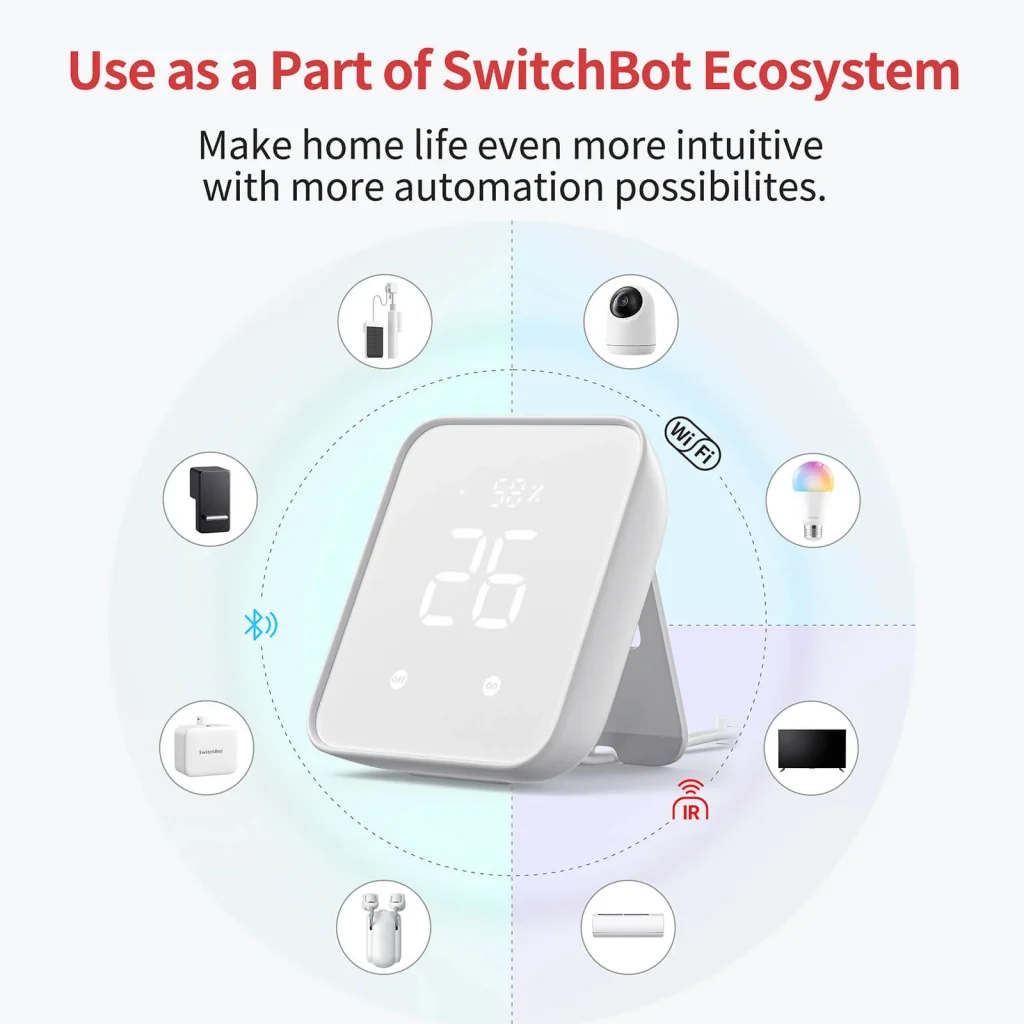
Caption: Hub 2 is most valuable when it connects several SwitchBot and infrared devices in the same room.
Source: SwitchBot official product media.
What We Do Not Like
The eight-device Matter limit feels restrictive
Eight devices may be sufficient for one room or a small apartment, but the limit can become inconvenient as your SwitchBot collection grows.
By comparison, Hub 3 supports up to 30 Matter sub-devices. That makes the newer model a better foundation for a larger home, despite its higher price.
Matter does not expose every feature
Adding a device to Apple Home does not guarantee that every SwitchBot app function will appear there. Certain appliances receive only basic on/off controls, and advanced configuration still takes place inside the SwitchBot app.
It remains dependent on careful placement
The same hub must communicate with Bluetooth products, send infrared signals and maintain a Wi-Fi connection. A poor location can weaken one of those functions.
Users with a large house may need more than one hub, particularly when devices are located on different floors or separated by thick walls.
Hub 3 now offers a clearer upgrade path
Hub 2 originally occupied the premium position in SwitchBot’s hub range. Hub 3 now adds a rotary dial, more customizable controls, broader Matter capacity, a larger display and the ability to manage supported third-party Matter devices.
The official price difference is significant: Hub 2 is currently listed at $69.99, while Hub 3 costs $119.99. Hub 2 therefore remains relevant as the less expensive choice, but it is no longer the most future-ready SwitchBot hub.
SwitchBot Hub 2 vs Hub 3
| Feature | SwitchBot Hub 2 | SwitchBot Hub 3 |
|---|---|---|
| Official price | $69.99 | $119.99 |
| Infrared control | Yes | Yes |
| Temperature and humidity | Yes | Yes |
| Ambient-light sensor | Yes | Yes |
| Matter support | Yes | Yes |
| Matter sub-device capacity | 8 | 30 |
| Physical controls | Two touch buttons | Dial and customizable buttons |
| Third-party Matter device control | Limited | Supported |
| Best for | Small or medium setups | Larger, expanding systems |
The official comparison confirms that both models offer infrared control, environmental sensors and Matter. Hub 3’s main advantages are its 30-device bridge capacity, expanded controls, increased range and greater processing resources.
Choose Hub 2 when price matters and you need only a modest number of devices.
Choose Hub 3 when you are starting a larger system, want better physical controls or expect to expand beyond eight Matter accessories.
Who Should Buy the SwitchBot Hub 2?
Hub 2 makes the most sense for people who:
- Already own SwitchBot Curtain, Blind Tilt, Lock, Bot or sensors
- Want to control older infrared appliances remotely
- Need temperature and humidity monitoring
- Want SwitchBot devices inside Apple Home
- Live in an apartment or smaller home
- Prefer physical scene buttons as well as app control
- Find Hub 3 unnecessarily expensive
It is especially suitable for renters because it can make existing appliances smarter without rewiring walls or permanently replacing equipment.
Who Should Skip It?
Consider another option when:
- You expect to bridge more than eight devices through Matter
- You want the most future-ready SwitchBot controller
- You already own a suitable hub and do not need environmental sensors
- Your appliances use RF or Bluetooth remotes instead of infrared
- You expect every SwitchBot feature to appear fully inside Apple Home
- You want extensive local controls without relying on apps or voice commands
A basic Hub Mini may be enough when you need only infrared and remote access. Hub 3 is the better long-term investment for a large SwitchBot installation.
Final Verdict: Is SwitchBot Hub 2 Worth It?
The SwitchBot Hub 2 remains a practical and well-balanced smart-home hub.
Its infrared controller can extend the life of older appliances. Its sensors support genuinely useful climate automations. Its buttons make scenes accessible without a phone, and Matter provides a path for bringing many SwitchBot products into Apple Home, Google Home and other ecosystems.
Its weaknesses are equally clear. The eight-device Matter limit is modest, certain bridged functions remain basic, and the arrival of Hub 3 makes Hub 2 feel less future-proof.
At $69.99, it is a reasonable purchase for a small or medium SwitchBot setup. On sale below $60, it becomes one of the better-value ways to combine infrared control, environmental monitoring and Matter bridging in a single device.
Worthflect recommendation: Buy it for an existing SwitchBot ecosystem or a room filled with infrared appliances. Choose Hub 3 instead when you are building a larger smart home from the beginning.
Final Score: 8.2/10
Frequently Asked Questions
Does SwitchBot Hub 2 work with Apple HomeKit?
Yes. Hub 2 connects supported SwitchBot devices to Apple Home through Matter. You will also need a compatible Apple home hub, such as a supported HomePod or Apple TV.
Can SwitchBot Hub 2 control an air conditioner?
Yes, provided the air conditioner uses a compatible infrared remote. Hub 2 can learn supported controls and operate the air conditioner through the SwitchBot app, scenes or voice assistants. Matter integration can expose cooling, heating and on/off functions for supported AC remotes.
Does SwitchBot Hub 2 support 5GHz Wi-Fi?
No. Hub 2 connects through 2.4GHz Wi-Fi. Users experiencing setup problems may need to temporarily disable the 5GHz band on a dual-band router.
How many devices can Hub 2 connect through Matter?
Hub 2 supports eight synchronized Matter sub-devices. Its temperature and humidity sensors can occupy two slots, although they may be removed to make all eight slots available for other devices.
Is SwitchBot Hub 2 better than Hub Mini?
Hub 2 is better when you need Matter, a display, temperature and humidity monitoring, a light sensor or physical scene buttons. A standard Hub Mini is more economical when you only need basic infrared and SwitchBot remote access.
Is SwitchBot Hub 3 worth the extra money?
Hub 3 is worth considering for larger systems because it supports up to 30 Matter sub-devices and adds a rotary dial, more customizable buttons, greater range and broader Matter control. Hub 2 remains the better-value option for smaller setups.


Leave a Reply