
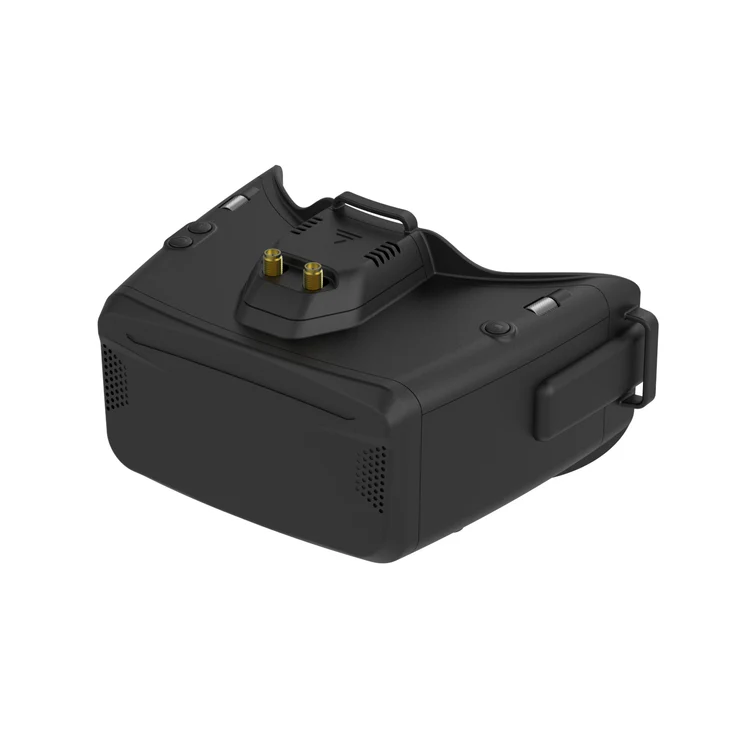
Caption: The Skyzone Cobra X V4 combines a large 50-degree LCD display with a removable SteadyView receiver in an affordable box-goggle design.
Quick Verdict: Is the Skyzone Cobra X V4 Worth Buying?
Yes. The Skyzone Cobra X V4 is one of the strongest box-style goggles for pilots who primarily fly analog FPV and want better reception, a large display and useful DVR recording without paying premium OLED-goggle prices.
Its 1280 × 720 LCD screen is bright and immersive, while the 50-degree field of view makes the flying experience feel much larger than what you get from basic entry-level goggles. The included SteadyView V3.3 receiver is also considerably more capable than the simple diversity receivers commonly supplied with cheaper FPV headsets.
The Cobra X V4 supports both 4:3 and 16:9 video, records H.264 footage at 60fps and can be powered by a single 18650 cell, a USB power source or an external 2S–6S battery.
The main compromise is its physical size. At approximately 332 grams and 190 × 150 × 110mm, it is much bulkier than compact binocular-style goggles. Its LCD panel also cannot reproduce the deep blacks and strong contrast of OLED models such as the Skyzone SKY04X.
At around $259–$272, the Cobra X V4 offers strong value when analog remains your main FPV system.
Worthflect overall rating: 8.6/10
Best for: Analog beginners, tiny-whoop pilots, casual freestyle flyers and glasses wearers who want a serious upgrade from basic box goggles.
Skip it if: You want a compact headset, already use a digital FPV system or can comfortably afford premium OLED goggles.
Important Version Note: Why Does the Product URL Say V2?
The supplied product URL still contains “Cobra X V2,” but the current product title, option selector and firmware section identify the model as the Cobra X V4.
SKYZONE also provides dedicated Cobra X V4 firmware and a V4 user manual on its download page. This review therefore covers the current V4 specification sold through the supplied link rather than the original Cobra X V2 hardware.
Skyzone Cobra X V4 Pros and Cons
Pros
- Large and immersive 50-degree field of view
- Sharp 1280 × 720 LCD display
- Supports both 4:3 and 16:9 video
- SteadyView V3.3 receiver included
- Removable receiver module
- H.264 DVR recording at 60fps
- Comfortable for many glasses wearers
- Simple shuttle-wheel menu controls
- Supports 18650, USB and 2S–6S battery power
- Head-tracking functionality included
- Much more affordable than premium OLED goggles
Cons
- Large and bulky compared with binocular goggles
- LCD blacks are less impressive than OLED
- Included antennas are basic
- A single 18650 battery may not provide enough runtime for long sessions
- Large FOV can reveal softness near the outer edges
- External digital use requires extra hardware and cables
- Plastic construction does not feel as premium as SKYZONE’s 04-series goggles
Who Should Buy the Cobra X V4?
The Cobra X V4 is ideal for someone who wants to move beyond a cheap starter headset but is not ready to spend $500 or more on premium OLED goggles.
It makes particular sense for pilots flying:
- Analog tiny whoops
- Entry-level freestyle quads
- Analog fixed-wing aircraft
- Backyard and park-flying builds
- Multiple inexpensive analog drones
- FPV simulators through an external video connection
It is also a practical option for glasses wearers. Unlike many compact binocular goggles, the Cobra’s larger housing leaves enough internal space for many small and medium prescription frames.
For a beginner who expects to continue flying analog, spending more on the Cobra X V4 can be smarter than purchasing a very cheap headset and replacing it several months later. Its display, receiver and DVR are capable enough to remain useful as your skills improve.
Who Should Skip It?
The Cobra X V4 is not suitable for every pilot.
Pilots already committed to DJI, Walksnail or HDZero should normally buy goggles designed specifically for their chosen digital system. Although the Cobra X can display certain external video sources, adding a digital receiver, extra cables and another power supply creates a much less convenient setup.
It is also not ideal for pilots who travel light. The Cobra X occupies considerably more space in a backpack than slim binocular goggles. Its weight is reasonable for a box headset, but the enclosure extends farther away from the face, creating more leverage on the forehead and cheeks.
Experienced analog pilots who already own high-quality OLED goggles will not gain better color or contrast by switching to the Cobra X. Its main advantage is value rather than absolute image quality.
Display Quality: Large, Bright and Immersive
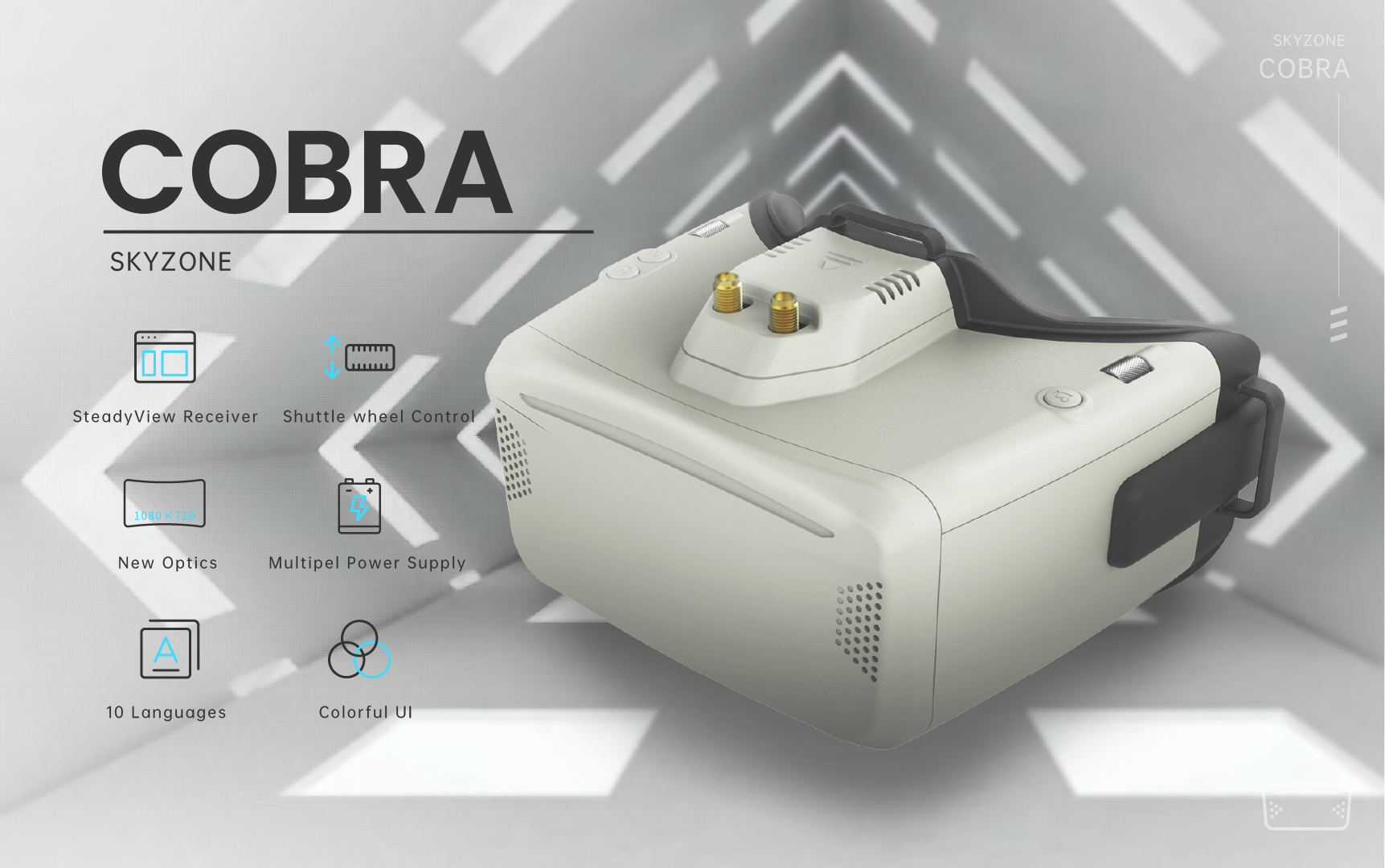
Caption: The Cobra X platform combines a high-resolution display, SteadyView receiver, shuttle-wheel controls and flexible power options.
Image source: SKYZONE official product
The Cobra X V4 uses a 1280 × 720 LCD screen with a diagonal field of view of 50 degrees. Both 4:3 and 16:9 aspect ratios are supported, allowing pilots to display traditional analog camera feeds without permanently stretching the image.
The 50-degree FOV is one of the headset’s strongest features. The picture feels large enough to create genuine immersion rather than appearing like a small screen floating in front of your face.
In real-world flying, the larger display helps when identifying:
- Indoor gates and furniture
- Tree branches and narrow gaps
- Racing flags
- Low-altitude terrain
- Small obstacles in the distance
The LCD produces good brightness and vivid colors, but it cannot match an OLED display’s black levels. Dark areas can appear slightly gray, especially when flying through forests, abandoned buildings or scenes containing both bright sky and deep shadows.
Even with this limitation, the Cobra X screen remains excellent for its price category.
Does the 1280 × 720 resolution matter for analog?
Not as much as the specification may suggest.
Traditional analog FPV cameras and transmitters do not deliver a true 720p image. The analog source remains the main limitation, regardless of how many pixels the display contains.
However, the higher-resolution screen still improves menu text, OSD scaling and external-video use. OSD elements can appear cleaner and less intrusive, while simulator menus and higher-quality external sources benefit more noticeably.
The Cobra X screen is therefore not transforming analog into HD, but it presents the available signal in a cleaner and more comfortable way.
4:3 vs 16:9: Select the Correct Format
Most traditional analog cameras use a 4:3 image. Selecting 4:3 mode preserves the correct proportions of gates, trees, buildings and people.
Using 16:9 mode with a 4:3 camera stretches the image horizontally. This can make gaps look wider and objects appear shorter than they really are, which may affect how you judge distance while flying.
Use 16:9 mode only when your camera outputs a genuine widescreen signal.
The ability to switch between both formats is valuable because the Cobra X V4 can work correctly with a wider range of cameras and external video sources.
SteadyView Receiver: The Real Reason to Upgrade
The included 5.8GHz 48-channel SteadyView V3.3 receiver is arguably more important than the screen resolution.
A basic diversity receiver monitors two antennas and switches to whichever one reports the stronger signal. SteadyView uses information from both receiver paths to improve image stability and reduce tearing, rolling and brief flickering when signal conditions change.
This receiver is particularly useful when flying:
- Indoors, where video signals reflect from walls
- Around trees and buildings
- Behind the pilot
- At moderate distances
- In areas with multipath interference
SteadyView does not eliminate signal loss. If the aircraft travels outside the usable range or flies behind a major obstruction, static will still increase. Its advantage is that the image often degrades more smoothly and remains usable for longer.
The receiver module is also removable. This gives experienced pilots the option of installing another compatible module later, although the stock SteadyView unit should be sufficient for most users.
Replace the included antennas first
The supplied linear antennas allow the goggles to function immediately, but they do not reveal the receiver’s full potential.
A more effective setup is:
- One circularly polarized omnidirectional antenna
- One directional patch antenna
The omnidirectional antenna provides coverage around the pilot, while the patch antenna improves reception in the direction the pilot is facing.
Make sure the antenna polarization matches the antenna on the aircraft. Use RHCP goggles antennas with an RHCP aircraft antenna, or LHCP with LHCP.
For most pilots, upgrading the antennas will produce a more noticeable improvement than replacing the SteadyView receiver.
Comfort and Glasses Compatibility
The Cobra X V4 looks more like a compact VR headset than a traditional pair of slim FPV goggles.
This bulk brings one important advantage: more room between the user’s face and the internal optics.
Many pilots can wear ordinary prescription glasses inside the headset, avoiding the need to purchase special corrective inserts. Small and medium glasses frames are the most likely to fit comfortably. Very wide or tall frames may press against the faceplate.
The broad face-contact area spreads pressure across the forehead and cheeks. Comfort still depends on facial shape, and some users may experience pressure around the nose or light leakage near the edges.
Because the headset extends farther from the face, strap adjustment is important. A loose strap allows the goggles to move when you turn your head, while an overly tight strap creates unnecessary pressure.
The Cobra X V4 is comfortable enough for normal flying sessions, but it will never feel as light or compact as premium binocular goggles.
Menu Controls and Everyday Use
SKYZONE’s shuttle-wheel interface is one of the Cobra X V4’s most convenient features.
Instead of repeatedly pressing several small buttons, pilots can roll and click the wheel to navigate settings while keeping the headset on.
Common settings include:
- Band and channel
- Receiver mode
- Screen brightness
- Contrast and color
- Aspect ratio
- DVR recording
- Head tracking
- System language
The official product page also lists a ten-language operating system.
The integrated menu communicates directly with the SteadyView module, creating a cleaner and more convenient experience than using a completely separate external receiver.
DVR Performance
The Cobra X V4 records H.264 footage at 60fps in MOV format at approximately 6Mbps. It supports microSD cards with a capacity of up to 128GB.
The DVR is useful for:
- Finding a crashed quad
- Reviewing racing lines
- Identifying where signal breakup occurred
- Checking OSD warnings
- Saving a flight when no action camera was installed
The recorded file captures the incoming analog feed rather than the full 1280 × 720 quality of the display. Static, interference and OSD information remain visible.
The DVR should therefore be viewed as a practical flight record rather than a replacement for GoPro-quality footage.
Compared with inexpensive goggles that record low-quality MJPEG footage at 30fps, the Cobra X V4 produces smoother and more useful recordings.
Power Options and Battery Life
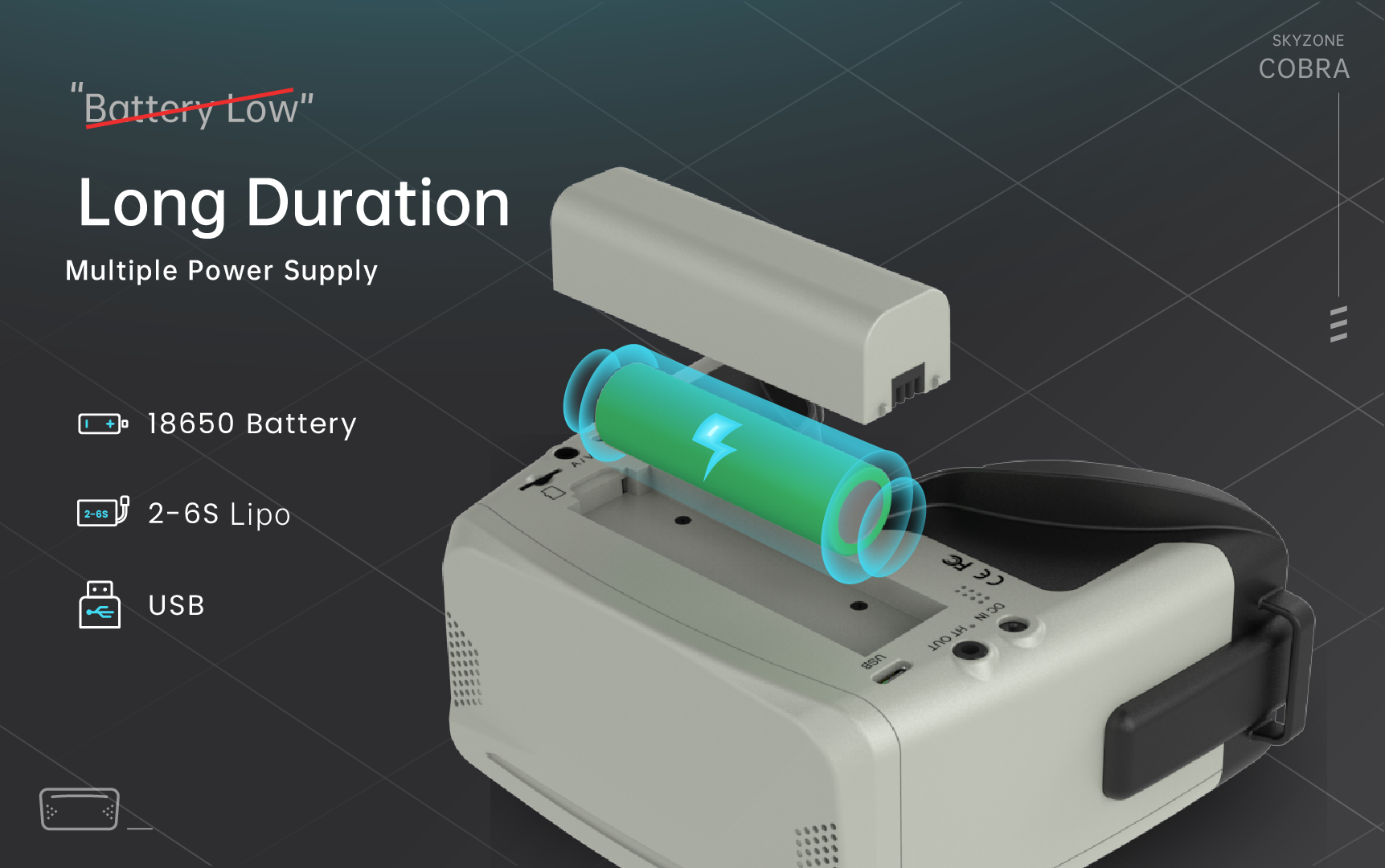
Caption: The rear battery compartment accepts one 18650 cell, while external 2S–6S and USB power provide alternatives for longer sessions.
Image source: SKYZONE official
Power flexibility is one of the Cobra X V4’s strongest practical features.
It can operate from:
- One removable 18650 lithium-ion cell
- A 2S–6S LiPo or Li-ion battery
- A 5V USB power source
- A 6.5–25.2V DC input
The internal 18650 option creates a clean setup without a power cable running to your pocket. However, runtime depends heavily on battery quality and capacity.
For long flying sessions, an external Li-ion pack or USB power bank may be more reliable. The goggles consume approximately 0.63A at 12V or 1.5A at 5V, according to the official specification.
An 18650 battery is not normally included, so buyers should expect to supply their own cell. Use a reputable battery rather than an unknown or recycled 18650.
Head Tracking
The Cobra X V4 includes a three-axis accelerometer and three-axis gyroscope for head-tracking output.
This feature is rarely needed for normal multirotor flying because the FPV camera is usually fixed in place.
It is more useful for fixed-wing aircraft fitted with a pan-and-tilt camera system. Turning your head can then control the camera’s direction, creating a more natural flying experience.
Most quad pilots may never use head tracking, but it adds flexibility for pilots who fly different types of aircraft.
Cobra X V4 vs Cobra SD
Cobra X V4:
- 1280 × 720 LCD screen
- 50-degree FOV
- 4:3 and 16:9 support
- SteadyView V3.3 receiver
- H.264 DVR at 60fps
- Supports memory cards up to 128GB
- Usually costs around $259–$272
Cobra SD:
- 800 × 480 LCD screen
- 50-degree FOV
- 4:3 and 16:9 support
- Standard diversity receiver
- MJPEG DVR at 30fps
- Supports smaller memory cards
- Usually costs considerably less
The Cobra SD is the better option for a strict budget. It preserves the same basic headset shape, large FOV and aspect-ratio support.
The Cobra X V4 earns its higher price through three practical upgrades:
- A higher-resolution screen
- A stronger SteadyView receiver
- A substantially better DVR system
For short-range indoor flying, the Cobra SD may be sufficient. For outdoor flying, obstacles, interference and regular DVR use, the Cobra X V4 is the better long-term purchase.
Cobra X V4 vs Premium OLED Goggles
Compared with premium goggles such as the SKY04X, the Cobra X V4 is:
- More affordable
- More spacious for glasses
- Easier for many beginners to use
- More immersive than some compact goggles
- Less expensive to replace
Premium OLED goggles provide:
- Deeper blacks
- Stronger contrast
- A smaller and lighter body
- More precise optical adjustment
- A more premium overall construction
The Cobra X V4 offers most of the functionality that matters to analog pilots at approximately half the price of many flagship OLED goggles.
It does not match their absolute image quality, but its price-to-performance ratio is excellent.
Firmware and Setup Advice
SKYZONE provides separate firmware files for the Cobra X V1, V2, V3 and V4.
Do not install firmware based only on the Cobra X product name. Confirm the exact hardware revision before downloading or flashing any update.
Before your first flight:
- Select the correct 4:3 or 16:9 aspect ratio.
- Format the microSD card in the goggles.
- Test DVR recording and playback.
- Install matching polarized antennas.
- Set the correct video band and channel.
- Verify the battery voltage display.
- Update firmware only when necessary.
Official firmware download page:
https://www.skyzonefpv.com/pages/download
Price and Value
The linked official product page has listed the Cobra X V4 at approximately $272, while other official SKYZONE listings have shown promotional pricing near $259.
Pricing may vary depending on region, color, stock and promotion.
Recommended buying prices:
- Below $220: Excellent value
- $220–$260: Strong purchase for analog FPV
- $260–$280: Still worthwhile when reception and DVR quality matter
- Above $300: Compare premium used goggles and digital alternatives
At approximately $259, the Cobra X V4 is more expensive than basic box goggles but also considerably more complete.
Adding a better receiver, antennas and a capable DVR to a cheaper headset can quickly reduce the apparent price difference.
Final Verdict
The Skyzone Cobra X V4 is worth buying for analog FPV pilots who want premium functionality without premium OLED-goggle pricing.
Its strongest quality is not one individual specification. The value comes from the complete package:
- Large 50-degree viewing experience
- 1280 × 720 display
- SteadyView V3.3 reception
- Removable receiver module
- 60fps H.264 DVR
- Glasses compatibility
- Simple menu controls
- Flexible battery options
The LCD cannot deliver OLED-level contrast, the body is bulky and the included antennas should eventually be replaced. These are genuine compromises, but they do not prevent the Cobra X V4 from delivering a convincing and enjoyable analog FPV experience.
Beginners who know they want to continue with analog can buy it as a long-term headset rather than a temporary starter product.
Experienced pilots can use it as a comfortable tiny-whoop, passenger or backup goggle. Fixed-wing pilots may also benefit from the large display and head-tracking support.
Worthflect recommendation: Buy it at $260 or less. At approximately $272, it remains a solid choice when analog reception, glasses compatibility and DVR quality matter more than compact size.
Frequently Asked Questions
Is the Skyzone Cobra X V4 good for beginners?
Yes. The menu is easy to navigate, the screen is large and the included SteadyView receiver means beginners do not need to immediately purchase a separate receiver module.
Is the Cobra X V4 analog or digital?
It is primarily a 5.8GHz analog FPV goggle. It can display certain external video sources, but it does not contain a native DJI, Walksnail or HDZero receiver.
Can I wear glasses with the Cobra X V4?
Many small and medium glasses frames fit inside the headset. Very tall or wide frames may feel uncomfortable.
Does the Cobra X V4 include an 18650 battery?
The official package list does not normally include an 18650 cell. Buyers should expect to purchase their own battery.
Does the Cobra X V4 use an OLED display?
No. It uses a 1280 × 720 LCD screen.
Is the Cobra X V4 better than the Cobra SD?
Yes. The Cobra X V4 provides a higher-resolution display, a better SteadyView receiver and smoother H.264 DVR recording at 60fps.
Should I replace the included antennas?
Yes. The stock antennas work, but a circularly polarized omnidirectional antenna combined with a patch antenna will better demonstrate the receiver’s capabilities.
What memory card does the Cobra X V4 support?
It supports microSD cards with a capacity of up to 128GB and records H.264 MOV files at 60fps.
SEO title: Skyzone Cobra X V4 Review: Best Analog Box Goggles?
Meta description: Is the Skyzone Cobra X V4 worth buying? This review covers its 720p display, SteadyView receiver, 60fps DVR, comfort, drawbacks and value.


Leave a Reply