
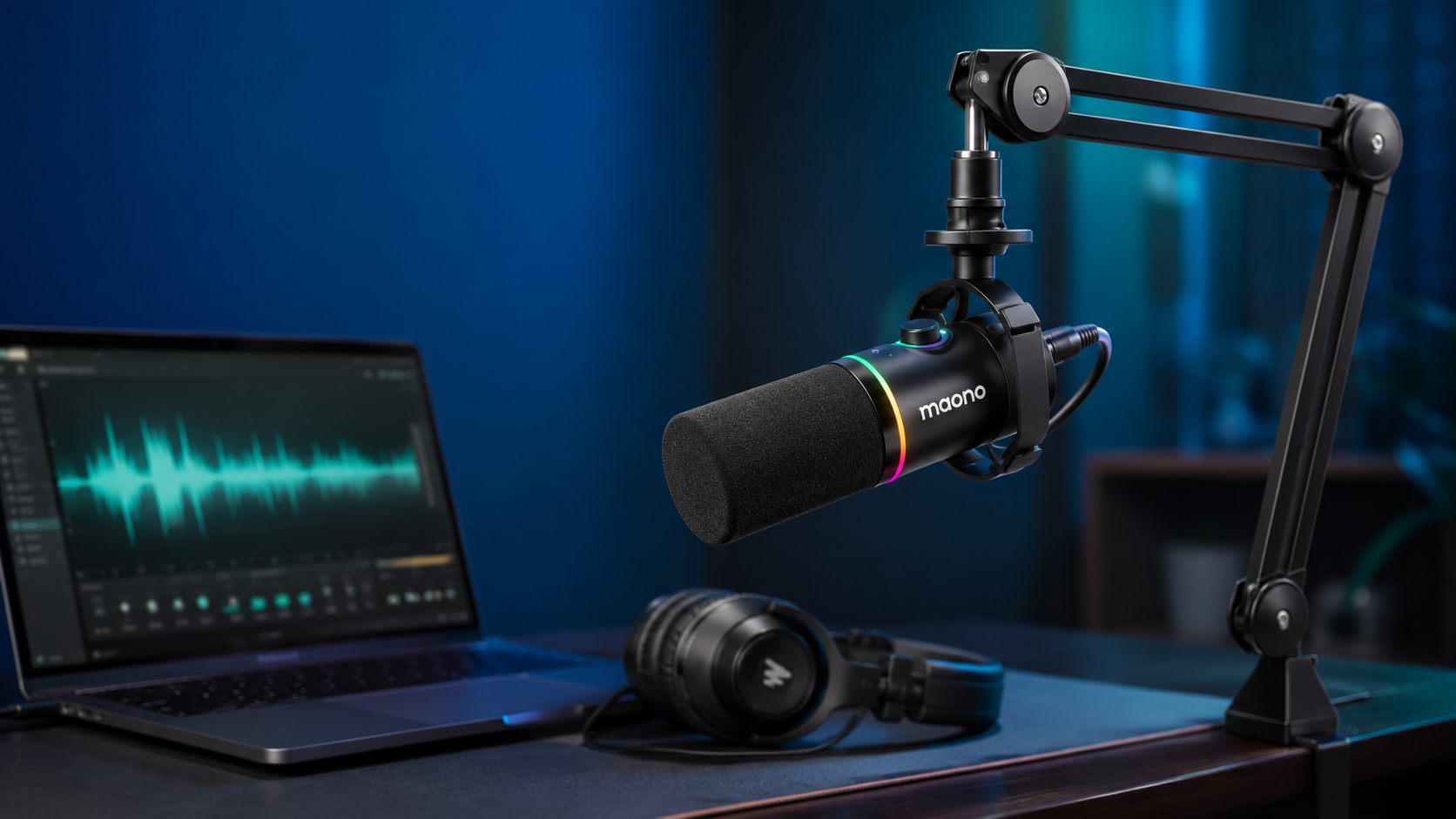
The Maono PD200X promises something many beginner creators want: clearer voice recordings, reduced background noise, simple USB operation, and an XLR connection for future upgrades—all without the price of a premium broadcast microphone.
But does it actually sound good enough for podcasting, gaming, streaming, and YouTube voice-over work?
In this Maono PD200X review, we examine the PD200X’s sound quality, noise rejection, controls, software, build quality, connectivity, included accessories, and most important limitations.

Important Product Name Clarification
Maono’s current wired microphone in this product family is officially called the PD200X. Therefore, this review uses “Maono PD200” as the search term but evaluates the Maono PD200X USB/XLR dynamic microphone.
It should not be confused with the PD200W, which adds a 2.4GHz wireless connection alongside USB and XLR.
Maono PD200X Review: Quick Verdict
The Maono PD200X is a strong budget microphone for podcasters, streamers, gamers, online teachers, and YouTube creators working from a normal home environment.
Its dynamic capsule and cardioid pickup pattern help keep the voice focused while reducing some keyboard noise, fan noise, and room reflections. It also provides both USB-C and XLR outputs, allowing beginners to start without an audio interface and upgrade later.
The sound is clear, full, and suitable for spoken-word content when the microphone is positioned close to the mouth. Independent reviewers have also found it capable of producing natural voice recordings in ordinary untreated rooms.
However, there are several compromises:
- The microphone normally requires a separate stand or boom arm.
- An XLR cable is not included in the standard microphone package.
- Physical button and knob adjustments may be audible during a live recording.
- Maono Link processing is available through USB, not through the analog XLR output.
- It must be used close to the speaker for the best result.
Overall rating: 4.3 out of 5
Maono PD200X Specifications
| Specification | Maono PD200X |
|---|---|
| Microphone type | Dynamic |
| Polar pattern | Cardioid |
| Connections | USB-C and XLR |
| Digital resolution | 24-bit/48kHz |
| Frequency response | 40Hz–16kHz |
| Gain range | 0–42dB |
| Maximum SPL | Above 130dB |
| Headphone monitoring | Yes, through 3.5mm output |
| Mute button | Yes |
| Software | Maono Link |
| RGB lighting | Nine selectable colors |
| Microphone weight | Approximately 314g |
| Main use | Podcasting, gaming, streaming and voice recording |
These specifications are taken from Maono’s current PD200X product and support documentation.
Who Should Buy the Maono PD200X?
The PD200X is best suited to buyers who:
- Record podcasts or YouTube narration at home
- Stream games from a bedroom or office
- Want better audio than a headset or webcam microphone
- Need USB plug-and-play convenience
- May want to upgrade to an XLR audio interface later
- Record in a room without professional acoustic treatment
- Want onboard gain, monitoring and mute controls
- Prefer a broadcast-style microphone without paying premium prices
Who Should Avoid It?
Consider another microphone when you:
- Need wireless recording
- Frequently move around while speaking
- Want a complete package with every stand and cable included
- Need a microphone for recording several people from across a table
- Want professional studio vocals rather than spoken-word content
- Regularly adjust physical controls during live broadcasts
- Want software processing while using the XLR output
For wireless, mobile, or two-microphone recording, the newer PD200W is the more flexible option.
Maono PD200X Sound Quality
Does the PD200X Sound Good?
The PD200X produces a full, direct voice sound with a noticeable emphasis on vocal clarity. It is designed primarily for spoken-word recording rather than distant room recording.
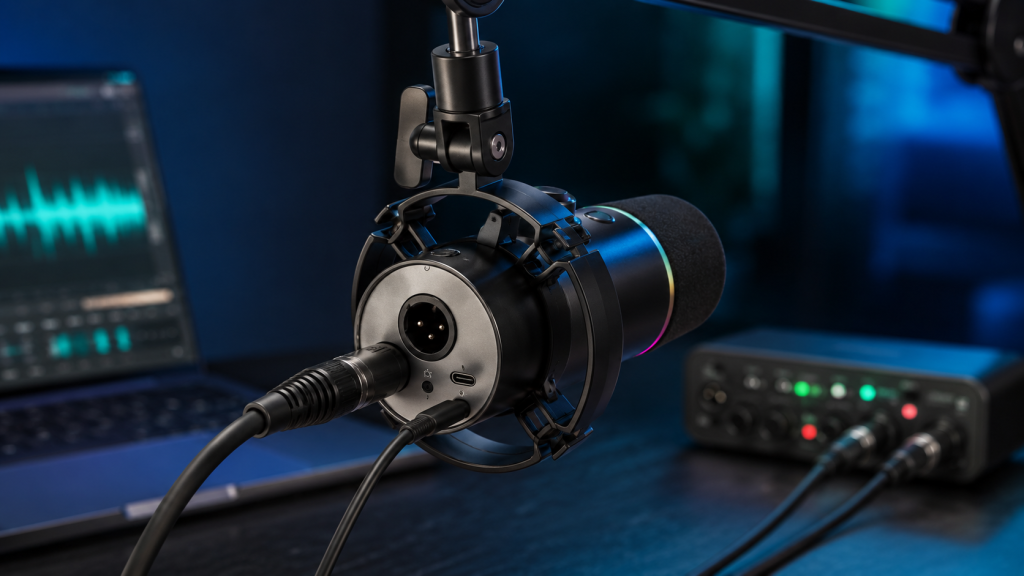
Its 40Hz–16kHz frequency response covers the frequencies needed for speech while avoiding the excessive high-frequency sensitivity found in many inexpensive condenser microphones. Maono describes the capsule as capable of capturing deeper lows, clear midrange frequencies, and controlled treble.
Independent hands-on reviews generally describe the PD200X as clear, natural, and surprisingly capable for its price. The Podcast Host rated it 4.1 out of 5 and considered it a good budget option for podcasting, while Prime Audio praised its audio quality, metal build, USB/XLR flexibility, and overall value.
Voice Character
The PD200X tends to produce:
- A reasonably full low end
- Clear and forward midrange frequencies
- Controlled treble without excessive sharpness
- A close, broadcast-style presentation
- Better voice isolation than a typical desktop condenser microphone
It works particularly well with deeper male voices, but the EQ settings in Maono Link can also help brighten a softer or darker voice.
Microphone Distance Matters
This is an end-address dynamic microphone, so you should speak directly into the foam-covered front rather than into the side.
Start with the microphone approximately four to six inches from your mouth. Moving significantly farther away will require more gain, which can introduce more room noise and make your voice sound thinner.
A boom arm makes it much easier to maintain the correct distance without placing the microphone in the middle of your desk.
Background-Noise Rejection
One of the main reasons to choose the PD200X is its performance in an untreated room.
The dynamic capsule and cardioid pickup pattern naturally prioritize sound arriving from the front. Maono states that the microphone is designed to reduce unwanted background noise, while independent testing has found that it can suppress off-axis sound and keep the speaker’s voice prominent.
It can help reduce:
- Computer fan noise
- Air-conditioning sounds
- Distant traffic
- Keyboard noise
- Mouse clicks
- Room echo
- Sounds coming from behind the microphone
However, “noise reduction” does not mean complete noise removal.
A mechanical keyboard placed directly beside the microphone can still be audible. Desk vibrations, tapping the microphone, and adjusting its controls may also enter the recording.
How to Reduce Background Noise
For the cleanest result:
- Place the PD200X close to your mouth.
- Keep the microphone gain as low as reasonably possible.
- Position the keyboard behind the microphone’s pickup direction.
- Mount the microphone on a boom arm.
- Avoid touching the desk or microphone during recording.
- Use curtains, rugs, or soft furniture to control room reflections.
- Apply Maono Link noise reduction moderately rather than aggressively.
Heavy noise reduction may make the voice sound processed or unnatural. Proper microphone placement should always be the first solution.
USB vs XLR: Which Connection Should You Use?
One of the PD200X’s biggest advantages is that it works as both a USB and an XLR microphone.
USB Mode
USB-C is the best starting point for most beginners.
Connect the microphone directly to your computer, select it as the recording input, adjust the gain, and begin recording. No audio interface is required.
USB mode gives you access to:
- 24-bit/48kHz digital recording
- Maono Link software
- Microphone gain control
- Headphone-volume control
- Direct monitoring
- One-touch mute
- RGB customization
- EQ, compressor and limiter settings
Maono lists plug-and-play compatibility with Windows, macOS and Android. Its product page also identifies support for smartphones, PCs, PlayStation 4, PlayStation 5 and audio interfaces, although adapters or specific connection methods may be required for some devices.
XLR Mode
XLR mode allows the PD200X to connect to an audio interface, mixer, podcast console, or other professional recording equipment.
Choose XLR when you:
- Already own a good audio interface
- Need multiple microphones
- Want physical mixer controls
- Plan to build a more advanced studio
- Need to integrate the microphone into an existing XLR setup
The XLR output sends the microphone’s analog signal to the connected interface. Maono Link features, RGB controls, USB monitoring, and software-based processing are not the main benefit of this mode.
Does XLR Automatically Sound Better?
Not necessarily.
USB mode already provides a complete digital signal path. Moving to XLR will only create a meaningful improvement when the connected interface has a good preamp and is configured correctly.
A cheap or noisy interface may not sound better than the microphone’s built-in USB connection.
For most beginners, USB is the more practical choice. XLR should be treated as an upgrade option rather than a requirement.
Controls and Headphone Monitoring
The PD200X includes a large multifunction control knob.
It can adjust:
- Microphone gain
- Headphone output volume
Pressing the knob switches between the two functions. The color indicator changes to show which setting is currently active.
There is also a one-click mute button, allowing you to silence the microphone during a stream, meeting, podcast, or game. Maono includes LED indicators so you can identify the microphone’s operating status in a dark setup.
Direct Monitoring
The 3.5mm headphone output lets you hear your microphone with minimal delay.
This is useful for:
- Checking microphone distance
- Hearing plosives and mouth noise
- Detecting clipping
- Maintaining a consistent speaking volume
- Monitoring game or computer audio
The Control Problem
The controls are useful, but their placement creates one of the PD200X’s most important limitations.
An independent Radio.co review found that the microphone could capture clicking and handling noise when the gain knob or mute button was adjusted. The controls also sit close to the mounting system, making them less convenient to operate quietly during a live recording.
For live broadcasts, adjust the settings before recording or control them through Maono Link when possible.
Maono Link Software
Maono Link adds useful digital processing and customization in USB mode.
Available settings include:
- Microphone gain
- Headphone volume
- Tone presets
- Equalization
- Compression
- Limiting
- Noise reduction
- RGB lighting
- Monitoring adjustments
- Firmware and compatibility updates
Maono’s current software information continues to list the PD200X among its supported and actively optimized products.
Is Maono Link Necessary?
No. The microphone can record through USB without extensive software configuration.
However, Maono Link is useful when your voice needs minor improvement. For example:
- Use a high-pass filter to reduce low-frequency desk rumble.
- Add a small presence boost to improve speech clarity.
- Use gentle compression to make volume more consistent.
- Set a limiter to reduce sudden volume peaks.
- Apply light noise reduction in a moderately noisy room.
The software does not record audio itself, so you will still need an application such as Audacity, OBS Studio, Adobe Audition, GarageBand, Reaper, or another recording platform.
Build Quality and Design
The PD200X has a metal body with a matte finish and an integrated mounting system. Maono lists the microphone itself at approximately 314 grams, making it solid without being excessively heavy.
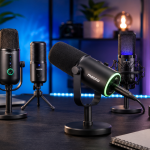
Its visual design combines a traditional broadcast microphone shape with RGB lighting around the rear control area.
The lighting can be set to nine different colors, which may appeal to gamers and streamers. It can also be adjusted to better match a desk setup.
The RGB lighting does not improve sound quality, but it gives the microphone a more distinctive appearance on camera.
What Comes in the Box?
The standard PD200X microphone package has commonly included:
- Maono PD200X dynamic microphone
- Integrated shock-mount-style holder
- USB-C to USB-A/C cable
- Thread adapter
- User documentation
Independent product inspections note that a traditional microphone stand, boom arm, and XLR cable may not be included in the basic package. Maono also sells several configurations that bundle the microphone with a desktop stand or boom arm, so buyers should check the exact selected option before ordering.
Additional Items You May Need
For USB recording:
- Boom arm or compatible desktop stand
- Headphones
- Recording software
For XLR recording:
- Audio interface or mixer
- XLR cable
- Boom arm or stand
- Headphones
Remember to include these extra costs when comparing the PD200X with a complete microphone kit.
Is the PD200X Good for Podcasting?
Yes. Podcasting is one of its strongest use cases.
The close, direct sound works well for solo podcasts, remote interviews, narration, and spoken-word recording. Its dynamic design also makes it easier to use in an untreated home office than a sensitive condenser microphone.
For a two-person podcast, use one microphone per speaker. Do not place a single PD200X in the center of a table and expect it to capture everyone clearly.
Is the PD200X Good for Gaming and Streaming?
Yes. The PD200X is a practical gaming and streaming microphone because it offers:
- USB plug-and-play operation
- Physical mute control
- Direct headphone monitoring
- Adjustable RGB lighting
- Better voice focus than most headset microphones
- Maono Link audio processing
- Compatibility with PC and supported PlayStation setups
Position the microphone between your mouth and keyboard, with the microphone’s rear facing the keyboard. This arrangement helps reduce key presses while keeping your voice clear.
Is the PD200X Good for YouTube and Voice-Overs?
The PD200X is well suited to:
- YouTube narration
- Faceless-channel voice-overs
- Product reviews
- Tutorials
- Commentary videos
- Online courses
- Audiobook practice
Its sound is clean enough for published spoken-word content when recording technique and room conditions are controlled.
For professional audiobook production or commercial voice acting, you may eventually want a quieter recording environment, more advanced preamps, acoustic treatment, and a higher-end microphone. But the PD200X is a sensible starting point.
Is the PD200X Good for Singing?
It can record vocals, demos, livestream performances, and social-media singing content.
However, the PD200X is primarily optimized for close spoken-word recording. It may not capture the openness, detail, and extended high frequencies expected from a dedicated studio condenser microphone.
It is better for podcasting, streaming and narration than for professional vocal production.
Maono PD200X vs PD200W

The PD200X is the better value for creators who record at a fixed desk. The PD200W is more suitable when wireless mobility, outdoor use, or dual-microphone recording matters.
Maono PD200X vs Shure MV7
The PD200X and Shure MV7 share several important features:
- Dynamic capsules
- USB and XLR connectivity
- Headphone monitoring
- Software-based audio processing
- Close-address broadcast designs
The PD200X is positioned as the more affordable option and adds RGB lighting. The Shure MV7 generally provides a more mature ecosystem, more refined controls, and better resistance to plosives and handling noise.
An independent comparison found that the PD200X could reproduce voices naturally and provide useful gain, but it was more sensitive to knocks, control adjustments, and physical handling than the MV7.
Choose the PD200X when value is the priority. Choose the MV7 when you are willing to pay more for refinement and an established professional audio ecosystem.
Maono PD200X Pros and Cons
Pros
- Clear and full spoken-word sound
- Dynamic capsule works well in normal rooms
- USB-C and XLR connectivity
- No audio interface needed for USB use
- Direct headphone monitoring
- Physical gain and headphone controls
- One-touch mute
- Maono Link EQ, compression and limiting
- Metal construction
- Customizable RGB lighting
- Suitable for podcasting, gaming and narration
- Provides a clear upgrade path
Cons
- Basic package may not include a stand or boom arm
- XLR cable may need to be purchased separately
- Physical controls can create audible handling noise
- Must be used close to the mouth
- Maono Link processing is primarily a USB-mode benefit
- Not wireless
- RGB lighting may be unnecessary for business users
- Less refined than premium broadcast microphones
Price and Value
At the time of checking on July 11, 2026, Maono’s official product page displayed a price of $89.99, although the final price depends on the selected stand, bundle, color, region, and available promotion.
The PD200X delivers its strongest value when:
- You find it below its standard listed price.
- You already own a compatible boom arm.
- You want both USB and XLR connections.
- You plan to use Maono Link.
- You record primarily at a fixed desk.
Its value becomes less impressive when you must purchase a premium boom arm, XLR cable, interface, and several accessories immediately.
For most beginners, the USB configuration with an affordable boom arm provides the best balance.
Frequently Asked Questions
Is the Maono PD200X a condenser or dynamic microphone?
The PD200X is a dynamic cardioid microphone.
Does the Maono PD200X require an audio interface?
No. You can connect it directly to a computer through USB-C. An audio interface is only required when using the XLR output.
Does the PD200X include a boom arm?
Package contents vary by configuration. Some bundles include a boom arm or desktop stand, while the basic microphone package may not. Check the selected bundle before purchasing.
Does the PD200X include an XLR cable?
Independent package inspections report that the basic package does not include an XLR cable. Buyers planning to use an audio interface should verify the current package and purchase a cable when necessary.
Does the PD200X work with a smartphone?
Maono lists smartphone and Android compatibility, but some phones may require a compatible USB-C connection or adapter.
Does it work with PlayStation?
Maono lists compatibility with PlayStation 4 and PlayStation 5. Console features and monitoring behavior may differ from computer use.
Does the PD200X work with Xbox?
USB microphone support on Xbox is limited. Buyers should not assume direct compatibility without using additional supported equipment.
Can the RGB lighting be turned off?
The PD200X provides RGB customization through its controls and Maono Link. Lighting can be adjusted to match a streaming setup or reduced when a more professional appearance is preferred.
How close should you speak into the PD200X?
Begin approximately four to six inches from the front of the microphone. Move slightly closer for stronger bass and better room-noise rejection, but avoid placing your mouth directly against the foam windscreen.
Is the PD200X good for a noisy room?
It is better suited to noisy or untreated rooms than most inexpensive condenser microphones. However, it cannot completely remove nearby keyboards, loud fans, conversations, or desk vibration.
Final Verdict: Is the Maono PD200X Worth It?
The Maono PD200X is worth buying for creators who want an affordable dynamic microphone with USB simplicity and XLR upgrade potential.
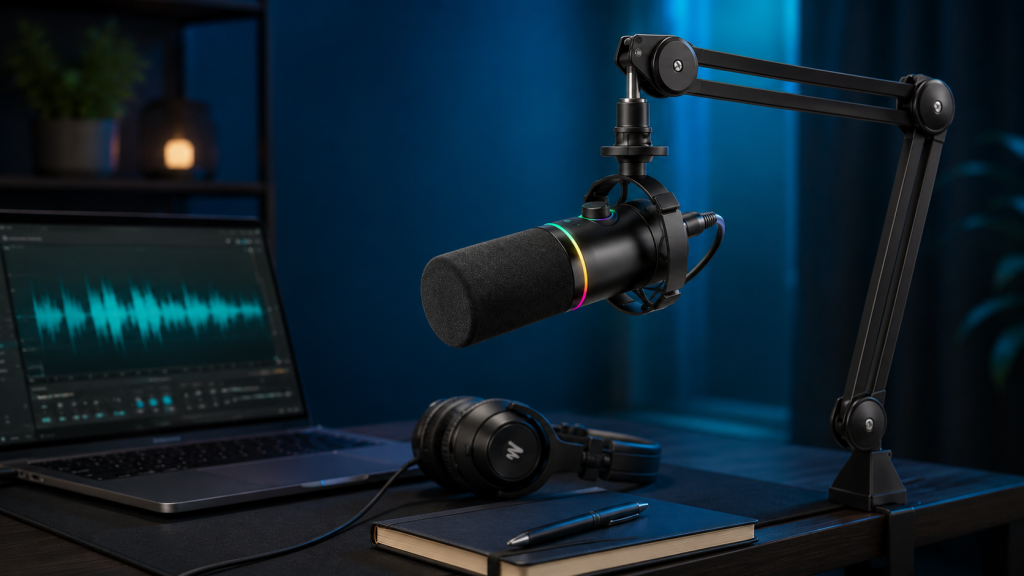
Its strongest qualities are its focused spoken-word sound, practical connectivity, direct monitoring, Maono Link processing, physical controls, and solid construction.
It is particularly suitable for:
- Beginner podcasters
- YouTube narrators
- Gamers and streamers
- Online teachers
- Remote workers
- Faceless content creators
- Buyers upgrading from headset microphones
Its biggest weaknesses are the need for a stand, possible extra accessory costs, audible handling noise from the physical controls, and the requirement to stay close to the microphone.
For a fixed home recording setup, the PD200X offers a convincing balance of sound quality, features, and affordability. Buyers who need wireless mobility should consider the PD200W, while those seeking a more premium and refined broadcast microphone may prefer the Shure MV7 or a higher-end Maono model.


Leave a Reply