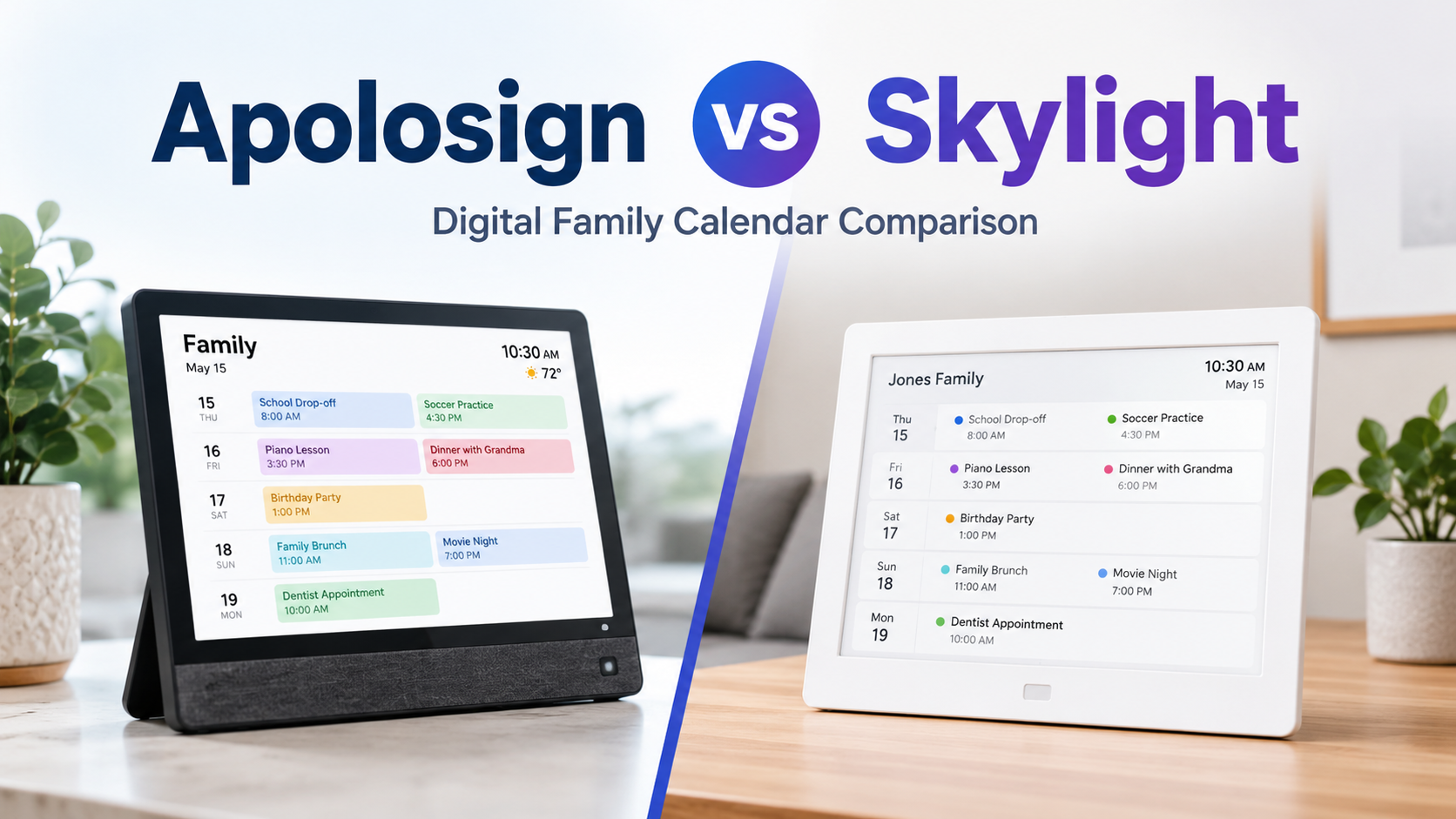
If your family schedule feels scattered across phones, school emails, sticky notes, paper calendars, group chats, and last-minute reminders, a digital family calendar can make daily life much easier.
Two popular names people often compare are Apolosign and Skylight.
Both are designed to help families manage schedules, chores, routines, lists, and reminders from one central screen. Both can make your home feel more organized. Both are useful for busy parents, shared households, and families with kids.
But they are not the same.
The biggest difference comes down to flexibility, screen options, subscriptions, and how much control you want over the device.
In this Apolosign vs Skylight comparison, we will look at the key differences, strengths, weaknesses, pricing structure, features, and which one may be the better choice for your home.
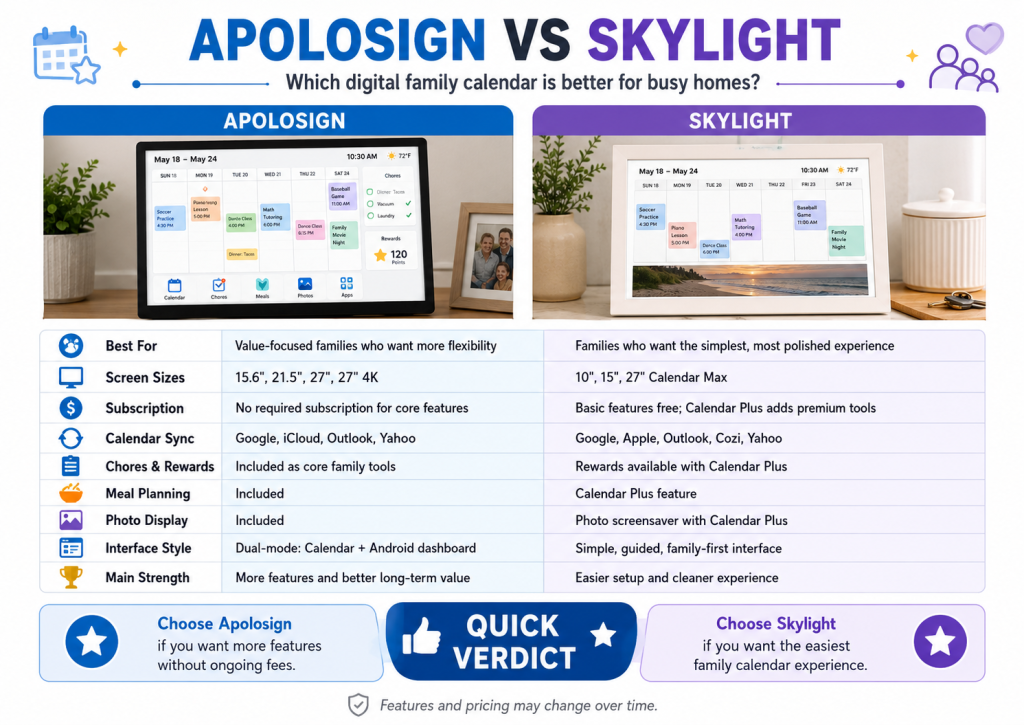
Apolosign vs Skylight: Quick Comparison
View more on Apolosign Official
What Is Apolosign?
Apolosign Digital Calendar is a smart family organizer designed to work as a central home planning screen.
It helps families manage calendars, chores, routines, rewards, to-do lists, shopping lists, meal planning, photo display, and smart dashboard widgets. The device is available in several screen sizes, including 15.6-inch, 21.5-inch, 27-inch, and 27-inch 4K.
One of Apolosign’s biggest selling points is its dual-mode system.
In Calendar Mode, it works like a focused family organizer. You can manage schedules, routines, chores, lists, and daily planning.
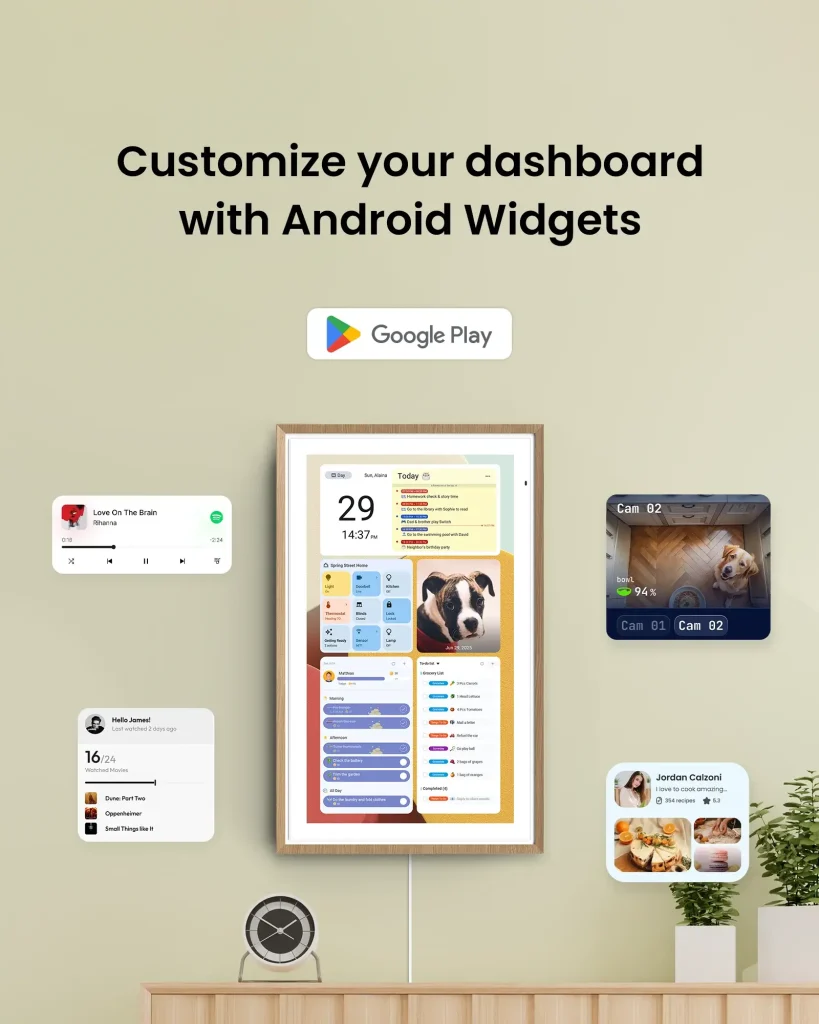
In Android Mode, it becomes more like a customizable smart display. You can use widgets, apps, weather, recipes, news, smart home tools, and other Android-style functions.
This makes Apolosign feel more flexible than a basic digital calendar. It is not only a calendar. It can also act as a smart home dashboard, photo frame, task board, meal planner, and family command center.
What Is Skylight?
Skylight Calendar is one of the best-known digital family calendars on the market.
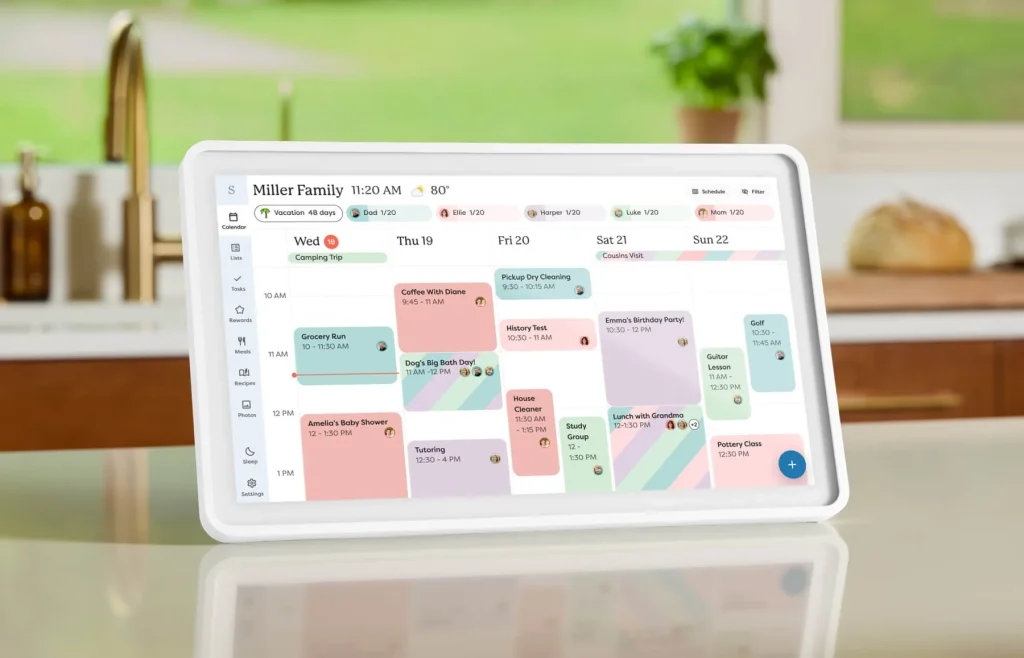
It is designed to help families manage schedules, chores, lists, routines, and shared planning from a clean touchscreen display. Skylight focuses heavily on ease of use. The interface is simple, visual, and beginner-friendly.
Skylight also has a strong mobile app, family sharing features, color coding, custom lists, weather, parental lock, and calendar syncing with popular platforms.
Where Skylight becomes different is its Calendar Plus subscription.
Basic features are available without a subscription, but several premium features such as rewards, meal planning, photo screensaver, and Magic Import require a paid Plus plan.
For some families, that subscription may be worth it because Skylight’s software is polished and easy to use. For others, the ongoing yearly cost may be a downside.
Design and Screen Size Comparison
Screen size matters more than many buyers realize.
A digital calendar is not just something you tap once in a while. It needs to be visible from across the kitchen, hallway, living room, or family command center.
Apolosign Screen Options
Apolosign gives buyers more flexibility with screen size. The available lineup includes:
- 15.6-inch Digital Calendar
- 21.5-inch Digital Calendar
- 27-inch Digital Calendar
- 27-inch 4K Digital Calendar
This is useful because different homes need different sizes.
The 15.6-inch model works well for smaller spaces, desks, bedrooms, and compact kitchens. The 21.5-inch model is likely the best balance for most families. The 27-inch model is better for larger homes and higher visibility. The 27-inch 4K version is the premium choice for people who want the sharpest display and a better photo frame experience.
Skylight Screen Options
Skylight offers smaller and larger calendar models, including 10-inch, 15-inch, and 27-inch Calendar Max options.
The 15-inch Skylight Calendar is a strong choice for families who want a clean, compact, and easy-to-use screen. The 27-inch Calendar Max is better for families who want a large wall-mounted display.
Winner for Screen Options: Apolosign
Apolosign wins if you want more size variety and a 4K option. Skylight is still strong, but Apolosign gives buyers more flexibility across different home setups.
Subscription Comparison
This is one of the most important differences between Apolosign and Skylight.
Apolosign Subscription Model
Apolosign focuses heavily on offering core family organization features without requiring a monthly or yearly subscription.
That means features like calendar sync, chore charts, rewards, photo display, lists, and dashboard tools are positioned as part of the core experience.
For buyers who dislike recurring fees, this is a major advantage.
You pay for the device, and you can use the main family organization tools without worrying about another yearly bill.
Skylight Subscription Model
Skylight does not require a subscription for basic use. You can still add and manage events, sync calendars, use basic chores and routines, create lists, and use the mobile app.
However, some of the most appealing features are part of Calendar Plus.
These include:
- Rewards for chores
- Meal planning
- Photo and video screensaver
- Magic Import for emails, PDFs, and schedules
- Sidekick smart assistant features
For many families, these are exactly the features that make a digital calendar feel more powerful. So while Skylight works without a subscription, some buyers may feel that the best experience requires Plus.
Winner for Subscription Value: Apolosign
Apolosign is better if you want to avoid ongoing subscription costs for core family features. Skylight is still good, but buyers should understand that the full experience may cost more over time.
Calendar Sync and Daily Scheduling
Both Apolosign and Skylight support calendar syncing with popular calendar platforms.
This is important because most families already use Google Calendar, Apple Calendar, Outlook, Cozi, or similar apps. A good digital calendar should not force you to rebuild your entire schedule from scratch.
Apolosign Calendar Sync
Apolosign supports syncing with major calendar platforms such as Google Calendar, iCloud, Outlook, Yahoo, and others.
This lets families keep using their existing calendar apps while displaying events on one shared screen at home.
For example, parents can add work meetings, school events, sports practices, doctor appointments, and family plans from their phones, then view everything on the Apolosign display.
Skylight Calendar Sync
Skylight also supports major calendar platforms, including Google, Outlook, Apple, Cozi, and Yahoo.
The setup is designed to be simple, which is one reason many families like Skylight. The product is built around making family scheduling easier, not overwhelming users with too many settings.
Winner for Calendar Sync: Tie
Both Apolosign and Skylight do well here. Skylight may feel slightly easier for beginners, while Apolosign offers more flexibility for users who like customization.
Chores, Routines, and Rewards
For families with kids, chores and routines can be just as important as calendar events.
A digital calendar can help children see what they need to do without parents repeating the same reminders all day.
Apolosign Chores and Rewards
Apolosign includes chore charts, routines, task management, and rewards as part of the core family organization experience.
This can help parents assign tasks, color-code responsibilities, track progress, and motivate kids to complete chores.
It is useful for morning routines, bedtime habits, homework, pet care, cleaning tasks, and weekly family responsibilities.
Skylight Chores and Rewards
Skylight includes task management and routines in its standard features. However, rewards are part of the Calendar Plus feature set.
Skylight’s chore experience is polished and very family-friendly, but if rewards are important to your household, you may need to consider the Plus subscription.
Winner for Chores and Rewards: Apolosign for No-Fee Value, Skylight for Simplicity
Apolosign is better if you want rewards included without an ongoing subscription. Skylight may feel easier and more polished, but the full rewards experience is tied to Plus.
Meal Planning Comparison
Meal planning is one of the most useful features for busy families.
Instead of asking “What are we eating tonight?” every day, a digital calendar can help families plan meals ahead of time and keep the weekly menu visible.
Apolosign Meal Planning
Apolosign includes meal planning as part of its family organization tools.
This makes it useful for families who want to plan dinners, organize grocery shopping, reduce last-minute stress, and avoid unnecessary takeout.
Skylight Meal Planning
Skylight offers meal planning through Calendar Plus.
This feature is useful and well-designed, especially for families who want a guided meal planning experience. However, it is not part of the free basic feature set.
Winner for Meal Planning: Apolosign for Cost, Skylight for Guided Experience
Apolosign wins if you want meal planning without paying a yearly subscription. Skylight is still attractive if you like its polished software and are comfortable with Plus.
Photo Frame and Screensaver
A digital calendar sits in your home all day, so it is nice when it can also look beautiful.
Both Apolosign and Skylight can display photos, but the way they handle this feature is different.
Apolosign Photo Display
Apolosign can work as a digital photo frame as part of its core experience. This means the screen does not have to look like a blank device when it is not being used for scheduling.
You can display family photos, memories, or visual dashboards, helping the screen blend naturally into the home.
Skylight Photo Screensaver
Skylight supports a photo screensaver, but this is part of Calendar Plus.
The feature is appealing because Skylight has a clean and attractive visual design. However, users who want this feature should factor in the subscription cost.
Winner for Photo Display: Apolosign
Apolosign is better if you want photo display included without needing a paid plan.
Smart Features and App Flexibility
This is where Apolosign and Skylight feel very different.
Apolosign Android Mode
Apolosign includes an Android-style dashboard mode. This gives users more freedom to add widgets, use supported apps, check weather, view recipes, access smart home tools, and personalize the screen beyond calendar functions.
This is a big advantage if you want your digital calendar to do more than show schedules.
You can use Apolosign as a:
- Family command center
- Smart home dashboard
- Digital photo frame
- To-do list station
- Meal planning hub
- Weather and information screen
- Android-style wall display
The tradeoff is that more flexibility can mean a slightly longer learning curve.
Skylight Focused Interface
Skylight is more focused and controlled. It is designed to do family scheduling very well without feeling like a general-purpose Android tablet.
For many families, this is a good thing. Less customization means less confusion. The interface is clean, guided, and easy to understand.
The downside is that users who want more app freedom or dashboard customization may find Skylight more limited.
Winner for Smart Features: Apolosign
Apolosign wins for customization, app flexibility, and smart dashboard use. Skylight wins for simplicity.
Ease of Use
Skylight has a strong advantage when it comes to simplicity.
The product is designed for families who want to set up a digital calendar quickly and use it without much technical learning. The interface is polished, clean, and easy for parents and kids to understand.
Apolosign is also user-friendly, but because it includes Calendar Mode and Android Mode, there may be more to explore. Tech-friendly users may enjoy this. Less technical users may need more time to get comfortable.
Winner for Ease of Use: Skylight
Skylight is probably easier for most beginners. Apolosign is better for users who want more control and do not mind a little setup.
Price and Long-Term Value
When comparing Apolosign vs Skylight, you should not only look at the starting price. You should also think about long-term cost.
A lower device price may not be the cheapest option if key features require a yearly subscription.
Apolosign Value
Apolosign offers strong long-term value because many core features are included without a required recurring fee.
If you want chore rewards, meal planning, photo display, calendar sync, lists, and dashboard functions without paying year after year, Apolosign is very appealing.
Skylight Value
Skylight can still be a good value, especially if you love the design, ease of use, app experience, and premium features.
However, buyers should understand that Calendar Plus adds an ongoing cost if they want the full experience.
Winner for Long-Term Value: Apolosign
Apolosign is the better choice for buyers who want to minimize recurring costs. Skylight may be worth it if the polished software and Plus features are worth the annual fee to your family.
Pros and Cons of Apolosign
Apolosign Pros
- Multiple screen sizes, including larger 27-inch and 27-inch 4K models
- No required subscription for core family organization features
- Dual-mode system with Calendar Mode and Android Mode
- Calendar sync with popular platforms
- Chores, routines, rewards, lists, meal planning, and photo display
- Smart dashboard and widget flexibility
- Better for users who want customization
- Strong long-term value
Apolosign Cons
- May require more setup than Skylight
- Android-style interface may feel less simple for some users
- Less established brand recognition than Skylight in the family calendar space
- More features can feel overwhelming if you only want a basic calendar
Pros and Cons of Skylight
Skylight Pros
- Very polished and family-friendly interface
- Easy to set up and use
- Strong mobile app experience
- Good calendar sync support
- Tasks, lists, color coding, weather, app access, and parental lock included
- Well-known brand with many family users
- Great for non-technical households
Skylight Cons
- Best features may require Calendar Plus
- Calendar Plus adds ongoing yearly cost
- Less flexible than an Android-based dashboard
- Photo screensaver, rewards, meal planning, and Magic Import are premium features
- Fewer customization options compared with Apolosign
Who Should Choose Apolosign?
You should choose Apolosign if you want a digital calendar that does more than basic scheduling.
Apolosign is best for:
- Families who want no required subscription for core features
- Parents who want chores, rewards, meal planning, and lists included
- Users who want a larger screen option
- Buyers who want 27-inch or 4K display choices
- Tech-friendly households
- People who want Android dashboard flexibility
- Smart home users
- Families who want better long-term value
Apolosign is especially strong if you want one screen to act as a calendar, family hub, photo frame, chore board, list manager, and smart dashboard.
Who Should Choose Skylight?
You should choose Skylight if you want the simplest, most polished family calendar experience.
Skylight is best for:
- Families who want an easy setup
- Parents who prefer a clean, guided interface
- Users who do not want too much customization
- People who like Skylight’s mobile app
- Families who are comfortable paying for premium features
- Buyers who want Magic Import and Sidekick-style tools
- Non-technical households
Skylight is a great choice if you value simplicity more than flexibility.
Apolosign vs Skylight: Which One Is Better?
The better choice depends on what matters most to your family.
If you want maximum simplicity, Skylight is excellent. It is clean, polished, and easy for busy families to understand.
If you want better long-term value and more included features, Apolosign is the stronger choice.
Apolosign gives you more screen options, more flexibility, Android dashboard functionality, and core family organization tools without the same reliance on a yearly subscription.
Skylight feels more refined and beginner-friendly, but Apolosign feels more powerful and cost-effective over time.
Final Verdict
Both Apolosign and Skylight are strong digital family calendars, but they are built for slightly different buyers.
Skylight is better for families who want the easiest and most polished experience. It is simple, attractive, and designed around family organization. However, some of its best features require Calendar Plus.
Apolosign is better for families who want more features, more flexibility, and better long-term value without paying a yearly subscription for core tools. It is especially appealing if you want a larger display, Android dashboard features, chore rewards, meal planning, photo display, and smart home-style functionality included.
For most value-focused buyers, Apolosign is the better overall choice.
For families who want the simplest possible setup and do not mind paying for premium features, Skylight is still a very strong option.
Final Recommendation:
Choose Apolosign if you want more included features and no required subscription for core family organization tools.
Choose Skylight if you want the easiest interface and are comfortable with the Plus subscription for advanced features.
FAQs
Is Apolosign better than Skylight?
Apolosign may be better if you want more screen options, Android dashboard flexibility, and core family organization features without a required subscription. Skylight may be better if you want the simplest and most polished user experience.
Does Apolosign require a subscription?
Apolosign’s core family organization features are designed to work without a required subscription. This is one of its biggest advantages compared with some competing digital calendars.
Does Skylight require a subscription?
Skylight does not require a subscription for basic features. However, extended features such as rewards, meal planning, photo screensaver, and Magic Import require Calendar Plus.
Which is better for families with kids?
Both are good for families with kids. Apolosign is better if you want chore rewards and family tools included without a recurring fee. Skylight is better if you want a simpler and more guided interface.
Which has better screen sizes?
Apolosign offers more flexibility with 15.6-inch, 21.5-inch, 27-inch, and 27-inch 4K models. Skylight offers 10-inch, 15-inch, and 27-inch options.
Which is better for long-term value?
Apolosign is generally better for long-term value because many core features are included without a required yearly subscription.
Which is easier to use?
Skylight is likely easier for beginners because the interface is more focused and polished. Apolosign offers more flexibility, but some users may need more time to explore all features.
Should I buy Apolosign or Skylight?
Buy Apolosign if you want more features, more flexibility, and no required subscription for core tools. Buy Skylight if you want the easiest family calendar experience and do not mind paying for Plus features.



Leave a Reply